
Plytix Pricing: Plans, Credits & Add-Ons
TL;DR
Plytix has three main pricing options: Standard, Pro, and Enterprise.
The Standard plan is free and includes core PIM and DAM functionality, 500 SKUs, 500 monthly credits, 5,000 API calls per hour, and unlimited users.
The Pro plan starts at €499/month and includes 50,000 SKUs, 500 monthly credits, 15,000 API calls per hour, unlimited users, and more advanced team management.
The Enterprise plan is custom and is designed for larger teams, agencies, multi-brand companies, or businesses with more complex product content operations.
All plans include 500 monthly credits, which are used for AI-powered actions and heavier processing tasks.
Optional Plytix add-ons like Brand Portals, Product PDFs, and product feeds are priced separately, so you only pay for the distribution tools your team actually needs.
How Plytix pricing works
Plytix pricing is built to be simple to start with and flexible as your product content needs grow. If you’re comparing Plytix plans, understanding Plytix cost, or evaluating a free PIM plan, the structure is designed to be easy to navigate.
You choose a base plan, get monthly credits included, and add extra usage, onboarding, or add-ons only when your setup calls for them. Right now, Plytix offers a Standard plan at €0/month, a Pro plan at €499/month, and Enterprise pricing on a custom basis. All plans include unlimited users.
Plytix pricing is made up of five main parts:
- Your base plan
- Your included monthly credits
- Any extra credits you buy
- Any optional add-ons you choose
- Your onboarding package
This structure keeps pricing flexible. Some teams mainly need a central place to organize product information and digital assets. Others need AI content workflows, ecommerce feeds, partner portals, automated PDFs, or more hands-on onboarding.
Instead of forcing every company into one giant package, Plytix lets you start with the plan that fits your current setup and add more only when you need it.
| Pricing factor | What it means | When it affects your cost |
|---|---|---|
| Base plan | Your main Plytix subscription | Always |
| Users | People who need access to Plytix | Never increases cost because all plans include unlimited users |
| Credits | Usage for AI actions and heavier processing tasks | If you need more than the monthly credits included in your plan |
| Add-ons | Extra tools like Brand Portals, Product PDFs, and product feeds | If your team needs additional distribution tools |
| Onboarding | Setup support and implementation help | If you choose a paid onboarding option |
| CDN traffic | External asset delivery from Plytix-hosted files | If you exceed the CDN allowance included with your account |
Plytix plans compared
The three main Plytix plans are designed to support different stages of growth, from a free PIM plan to fully customized enterprise setups.
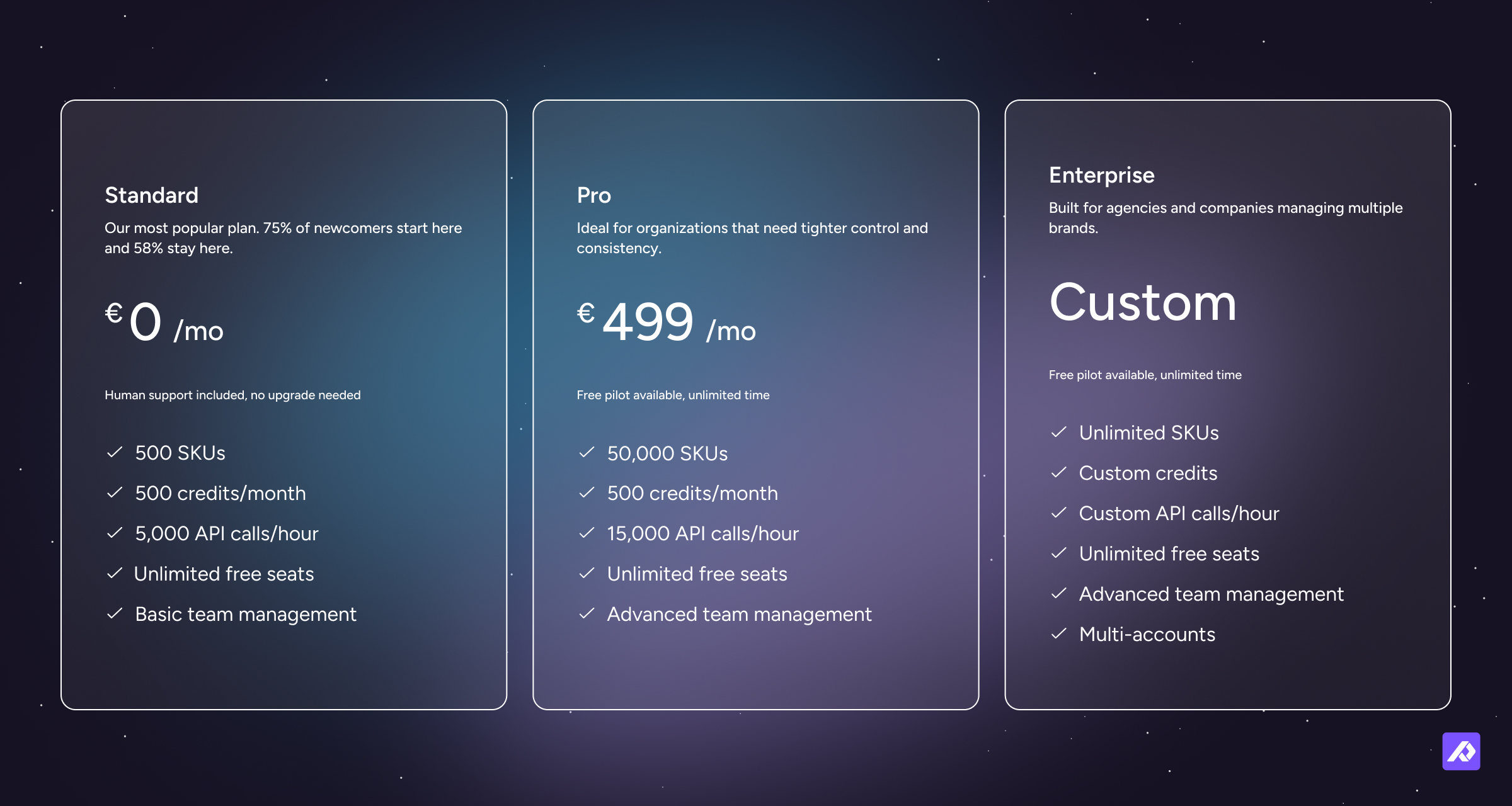
Standard
Standard is the free Plytix plan.
It includes 500 SKUs, 500 credits per month, 5,000 API calls per hour, unlimited seats, and core platform access. It is also where most customers begin, with 75% of newcomers starting on Standard and 58% staying there.
This plan makes sense for teams that are ready to stop living out of spreadsheets but do not want pricing to be the thing that slows them down.
Pro
Pro is currently listed at €499/month.
It includes 50,000 SKUs, 500 credits per month, 15,000 API calls per hour, unlimited seats, and more advanced team management.
This is usually the right fit when your catalog is bigger, your workflows are more structured, or you need tighter control over who can do what.
Enterprise
Enterprise pricing is custom.
It is designed for larger organizations, agencies, and companies managing multiple brands or more complex setups. It includes unlimited SKUs, custom credits, custom API capacity, unlimited seats, and multi-account support.
This is the plan for teams that need more scale, more flexibility, or a setup shaped around how their business actually runs.
Which Plytix plan is right for you?
The right Plytix plan depends on your catalog size, team structure, workflows, and how much product content you need to manage or distribute.
| Choose this plan | If you need... | Good fit for... |
|---|---|---|
| Standard | A free way to start organizing product content and assets | Smaller catalogs, early PIM exploration, teams moving away from spreadsheets |
| Pro | More scale, more structure, and stronger team controls | Growing ecommerce, marketing, and product teams |
| Enterprise | Custom capacity, multi-account support, or more complex implementation needs | Larger organizations, agencies, multi-brand businesses, and complex product operations |
Choose Standard if you want to get started with PIM without a budget barrier. It is a good choice if you have a smaller catalog, want to move away from spreadsheets, or need a central place to manage product information and assets.
Choose Pro if your product content process is becoming more serious. It is a better fit if you manage a larger catalog, need more advanced team controls, work across multiple departments, or want more room to scale your product data operations.
Choose Enterprise if your setup is more complex. It is best for larger teams, agencies, multi-brand companies, or organizations with custom requirements around SKUs, credits, API usage, accounts, or implementation.
Users, support, and collaboration
Plytix pricing is designed to support the way product content work actually happens: across teams. Product information usually touches ecommerce, marketing, product, sales, operations, and sometimes external partners too.
That is why user access and support are important parts of understanding the value behind the pricing.
Unlimited users on every plan
A lot of software gets expensive the second more people need access. Plytix does not work that way.
All plans include unlimited seats, which means your ecommerce team, product team, sales team, marketing team, and external collaborators do not need to fight over logins or get left out because pricing is tied to headcount.
That matters because product content is almost never a one-person job. It moves across teams. And pricing should support collaboration, not punish it.
Support that actually feels supportive
Plytix support depends on your plan, but support is one of the areas where Plytix really shines. It is also one of the top things customers value about working with us.
Standard includes chat and email support. Pro and Enterprise include an assigned Customer Success Manager, giving teams more guidance as their catalog, workflows, and product content operations become more complex.
That matters because the support you need often changes as your setup grows. A team just starting with a smaller catalog may need help getting familiar with the platform. A larger team may need more strategic guidance around workflows, implementation, team adoption, and scaling their product content process.
Credits, AI usage, and CDN traffic
Credits are the flexible usage part of Plytix pricing. They help keep the core platform accessible while letting heavier usage scale more naturally.
This matters most for teams using AI-powered actions, image tasks, and external asset delivery at higher volumes.
How Plytix credits work
Credits are the flexible part of Plytix credits pricing.
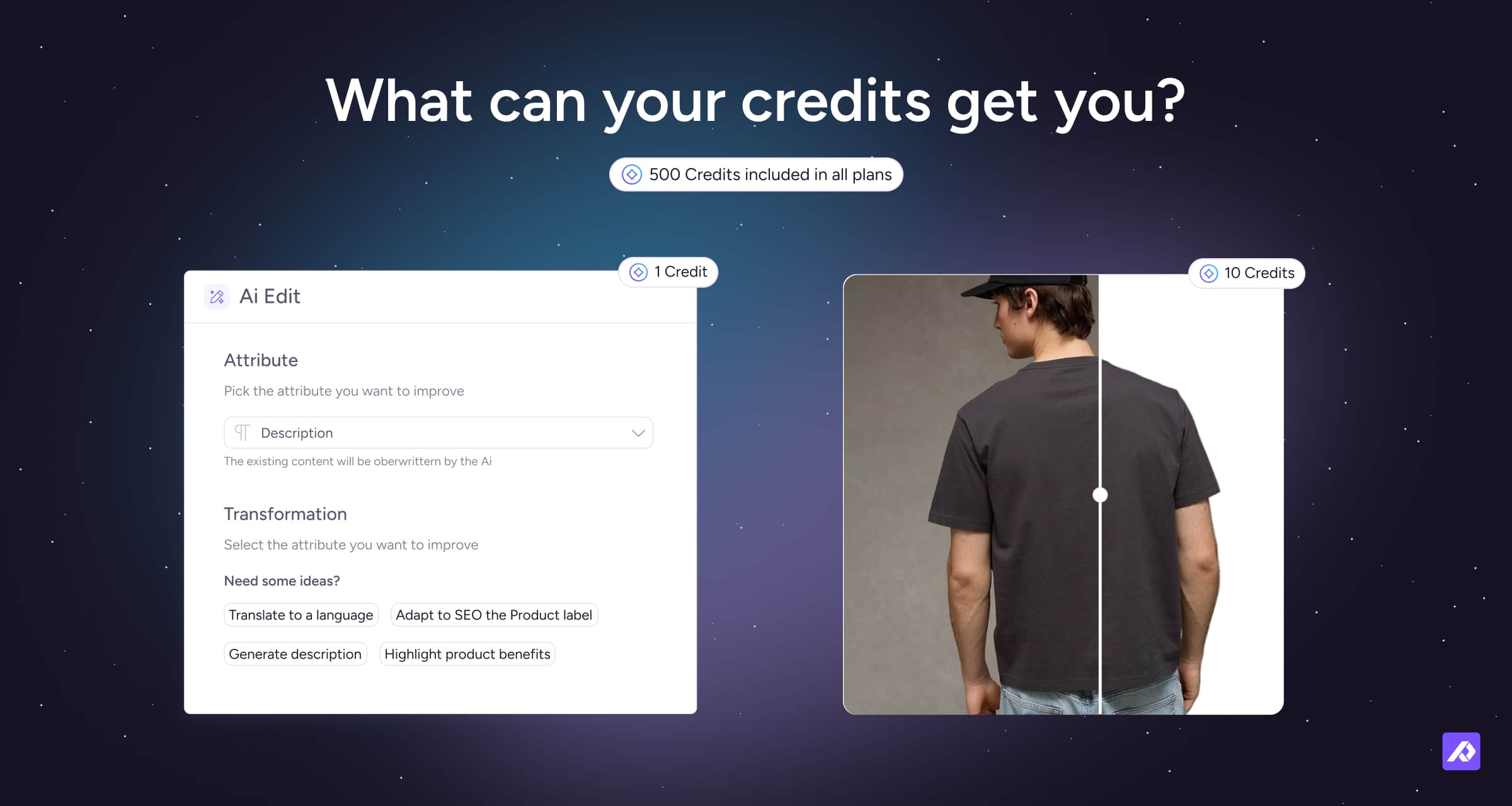
Every plan comes with 500 free credits per month, and those credits are used for AI-powered actions and other heavier jobs. For example, an AI text edit uses 1 credit, removing a background uses 10 credits, and upscaling an image uses 30 credits. Extra monthly credits are priced at €10 per 1,000.
| Credit usage | Credits used | Included plan value | Overage value |
|---|---|---|---|
| Text edits | 1 credit | €0.01 | €0.02 |
| Image relighting | 10 credits | €0.10 | €0.20 |
| Custom image editing | 10 credits | €0.10 | €0.20 |
| Image upscaling | 30 credits | €0.30 | €0.60 |
| Shopify ready images | 30 credits | €0.30 | €0.60 |
| Buy monthly credits | 1,000 credits | €10 | — |
The nice thing about this model is that a team that mostly needs structure and exports is not forced into the same price model as a team running high-volume AI transformations across thousands of products every month.
Buying more credits
If the credits included in your plan are enough, you can simply use what is already included.
If you need more, you can buy extra monthly credits at €10 per 1,000 credits.
This is especially useful if your usage changes throughout the year. For example, you might need more credits during a seasonal launch, a large catalog cleanup, a translation project, or a big AI image editing push.
CDN traffic and credits
Plytix also measures CDN traffic, which is the amount of asset data transferred when your publicly accessible files are loaded outside the Plytix platform.
In simple terms, this usually matters when product images or other assets are being delivered to external systems, websites, ecommerce platforms, or apps. If that traffic goes beyond the allowance included with your account, it can start consuming credits.
Right now, 1 GB of CDN traffic = 5 credits.
That means CDN usage can affect your total cost, but only if your account is pushing a larger volume of asset traffic externally. For many teams, this will not be a major factor. But it becomes more relevant if you:
- embed Plytix-hosted asset URLs directly on a public website
- sync large numbers of images to ecommerce platforms like Shopify or BigCommerce
- pull assets into external servers or third-party tools
- run frequent large-scale asset updates
Not all asset activity counts toward CDN usage. Things like working inside the Plytix PIM itself are treated differently, so normal in-platform usage is not the same as public delivery traffic.
If your business depends heavily on external asset delivery, it is worth checking your usage in account settings and planning your credit level accordingly.
Add-ons and onboarding
Some teams need more than a central place to manage product information and digital assets. Add-ons and onboarding options help you shape Plytix around how your business works.
That could mean adding tools for distribution, partner sharing, product PDFs, ecommerce connections, or more hands-on setup support.
Add-on options
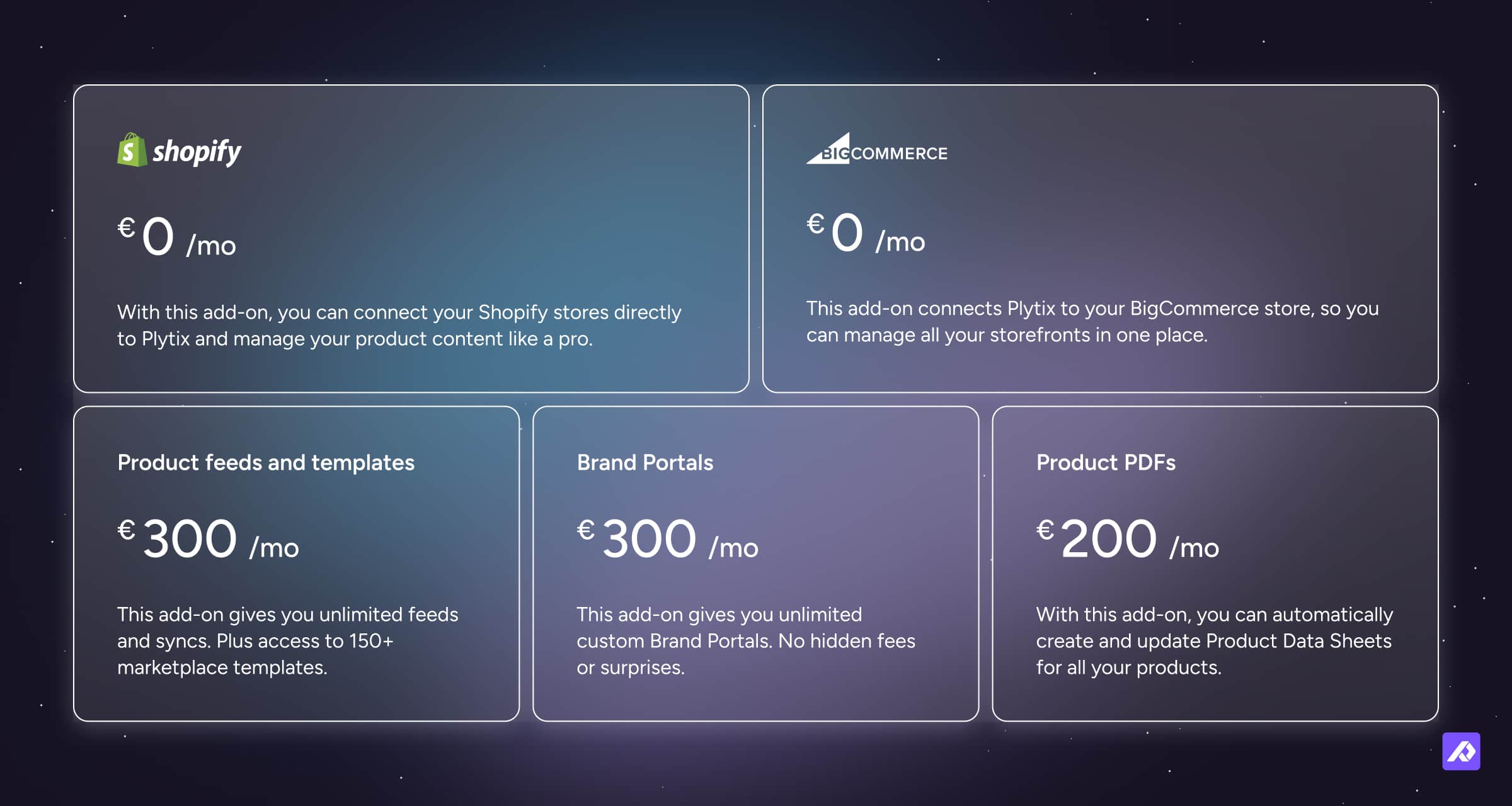
Some teams need more than a central place to manage product content. That’s where Plytix add-ons come in. These Plytix add-ons let you tailor the platform to your exact distribution and workflow needs.
Add On Options:
- Product feeds and templates: €300/month
- Brand Portals: €300/month
- Product Data Sheets: €200/month
- Shopify: €0/month
- BigCommerce: €0/month
| Add-on | Price | What it’s for |
|---|---|---|
| Product feeds and templates | €300/month | Sending product data to ecommerce channels, marketplaces, or other destinations |
| Brand Portals | €300/month | Sharing live product content and assets with partners, retailers, or distributors |
| Product Data Sheets | €200/month | Creating product data sheets and sales-ready PDFs |
| Shopify | €0/month | Connecting Plytix with Shopify |
| BigCommerce | €0/month | Connecting Plytix with BigCommerce |
This setup is helpful because not every company needs the same distribution tools.
A manufacturer selling through dealers might get a lot of value from Brand Portals. A team that needs ready-to-send sales materials may care more about Product PDFs. And a brand pushing product data to lots of channels may need feeds and templates.
The point is, you can add what supports your workflow instead of paying upfront for every possible extra.
Onboarding options
Plytix separates onboarding from the monthly software fee, which makes the recurring price easier to understand.
The current onboarding options are:
- Standard onboarding: €0
- Purple onboarding: €3,000 one-time
- Full-service managed onboarding: custom pricing
| Onboarding option | Price | What it’s for |
|---|---|---|
| Standard onboarding | €0 | Basic onboarding support |
| Purple onboarding | €3,000 one-time | More hands-on setup and guidance |
| Full-service managed onboarding | Custom | Managed implementation support |
That gives teams a bit of choice. Some are happy with guided support and a strong success manager. Others want more hands-on help, a structured implementation plan, or a partner to handle more of the heavy lifting.
Either way, onboarding is not treated like a hidden recurring charge. It is a separate decision based on how much help you want getting set up.
API, billing, and payment
A few practical details can also affect how teams evaluate Plytix pricing, especially if they are thinking about integrations, contract flexibility, or payment logistics.
API access by plan
Plytix has an API.
The API is used to bring data into Plytix or share product information and assets with other platforms. API capacity depends on your plan.
Standard includes 5,000 API calls per hour. Pro includes 15,000 API calls per hour. Enterprise can include custom API capacity.
For pricing, the important thing to know is that API access is included in the plan structure, but the available capacity changes depending on the plan.
Billing and cancellation
Plytix plans are billed monthly and can be canceled at any time.
That makes it easier to get started without a large upfront commitment. Your total cost can still depend on your plan, credits, add-ons, onboarding, and usage, but the base structure is designed to stay flexible.
Payment methods
Plytix accepts payment by credit card or bank transfer.
Understanding your total Plytix cost
The best way to understand your total Plytix cost is to look at your plan, usage, and setup needs together.
Your total cost may include:
- Your base plan
- Extra credits, if needed
- Add-ons like Brand Portals, Product PDFs, or feeds
- Onboarding, if you choose a paid onboarding option
- Additional CDN traffic, if your external asset delivery exceeds your allowance
| Cost area | Included by default? | Can increase total cost? | Notes |
|---|---|---|---|
| Base plan | Yes | Yes | Depends on whether you choose Standard, Pro, or Enterprise |
| Users | Yes | No | All plans include unlimited users |
| Monthly credits | Yes | Yes | All plans include credits, but extra credits can be purchased |
| Add-ons | No | Yes | Brand Portals, Product PDFs, and product feeds are optional paid add-ons |
| Onboarding | Depends | Yes | Standard onboarding is €0, while other onboarding options may cost extra |
| CDN traffic | Included up to your allowance | Yes | Extra external asset delivery can consume credits |
For many teams, the base plan and included credits may be enough to start. For more complex teams, the total cost depends on how much product content you manage, how many channels you support, how much AI usage you need, and how much implementation support you want.
Final thoughts
Plytix pricing is designed to make it easy to start and sensible to scale.
You choose a base plan. You get monthly credits included. You can add more credits if your usage grows. And if your business needs extra ways to distribute product content, like feeds, Brand Portals, or Product PDFs, you can add those separately.
That keeps the pricing flexible enough for smaller teams getting started, while still giving larger teams room to scale their product content operations.
Frequently Asked Questions
Plytix offers a Standard plan at €0/month, a Pro plan at €499/month, and Enterprise pricing on a custom basis. Your total cost can also depend on credits, add-ons, onboarding, and CDN usage.
Yes. The Standard plan is free and includes 500 SKUs, 500 monthly credits, 5,000 API calls per hour, unlimited users, and core platform access.
No. All current Plytix plans include unlimited users.
Credits are used for AI-powered actions and certain heavier processing tasks. For example, AI text edits use 1 credit, while image tasks like background removal or relighting use 10 credits.
Product feeds and templates cost €300/month, Brand Portals cost €300/month, and Product PDFs cost €200/month. Shopify and BigCommerce are currently listed at €0/month.