
How Plytix Works: Turn Product Content Into Your Strongest Growth Engine
TL;DR
- What Plytix does: Centralizes, structures, enriches, reviews, and publishes product content from one place.
- How it works: Import product data, organize it in the PIM, connect assets in the DAM, improve content with AI Content Studio, review it with your team, and publish it through Feed Management.
- How Plytix keeps catalogs organized: Features like Product Families, Attribute Groups, and Completeness Attributes help teams manage growing catalogs more clearly.
- How teams collaborate: User Roles, permissions, and Team Comments help the right people edit, review, and approve product content.
- How content gets out: Feed Management, Shopify Content Manager, Brand Portals, and Product Data Sheets help teams distribute and share content across channels and partners.
- Why it matters: One update can flow across outputs, which reduces manual work, improves consistency, and makes launches easier to scale.
Introduction: From scattered data to Content Led Growth
Most teams do not struggle because they lack product information. They struggle because the information they already have is hard to improve, hard to trust, and hard to reuse. That is where Plytix works differently.
Plytix is a product content platform that helps teams turn scattered product information into better product content, then makes that content easier to scale across every channel. Instead of stitching together separate tools for product data, assets, AI copy, and feeds, teams can improve product content in one connected system and reuse those improvements everywhere they sell.
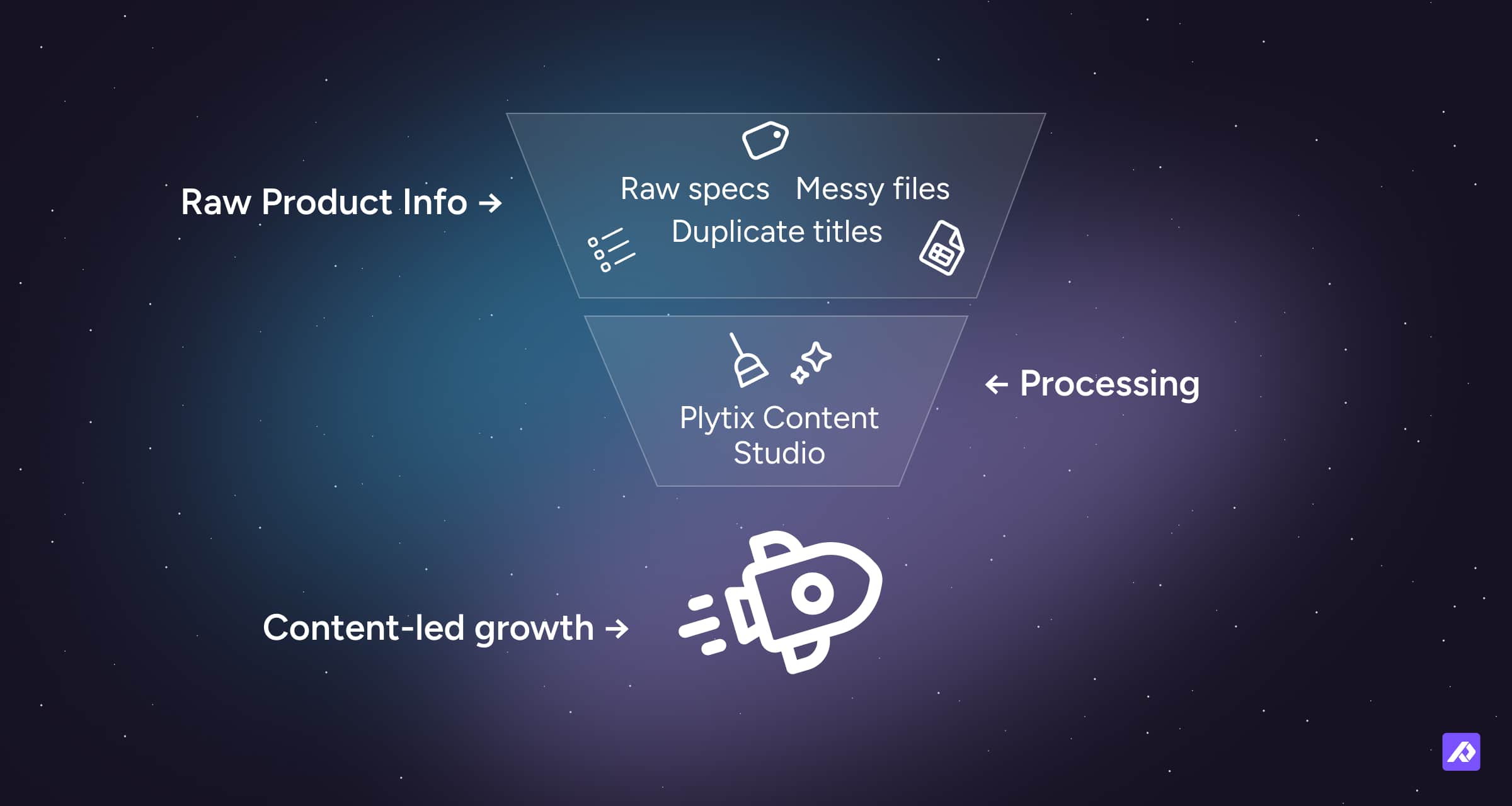
That matters because better product content does real work. It helps products get discovered, makes listings easier to trust, and gives teams a faster way to launch and update what they sell.
What does Plytix actually do?
As a product content platform, Plytix helps teams turn raw product data into better product content, then scale it across channels without losing accuracy, consistency, or speed.
The practical problem is usually the same. Specs sit in spreadsheets. Assets live in folders. Copy gets rewritten in docs. Channel requirements live in someone’s head. Teams end up spending their time fixing the same content problems again and again.
Plytix is built to break that pattern. It gives teams one shared product record where they can improve the content itself, not just keep it organized.
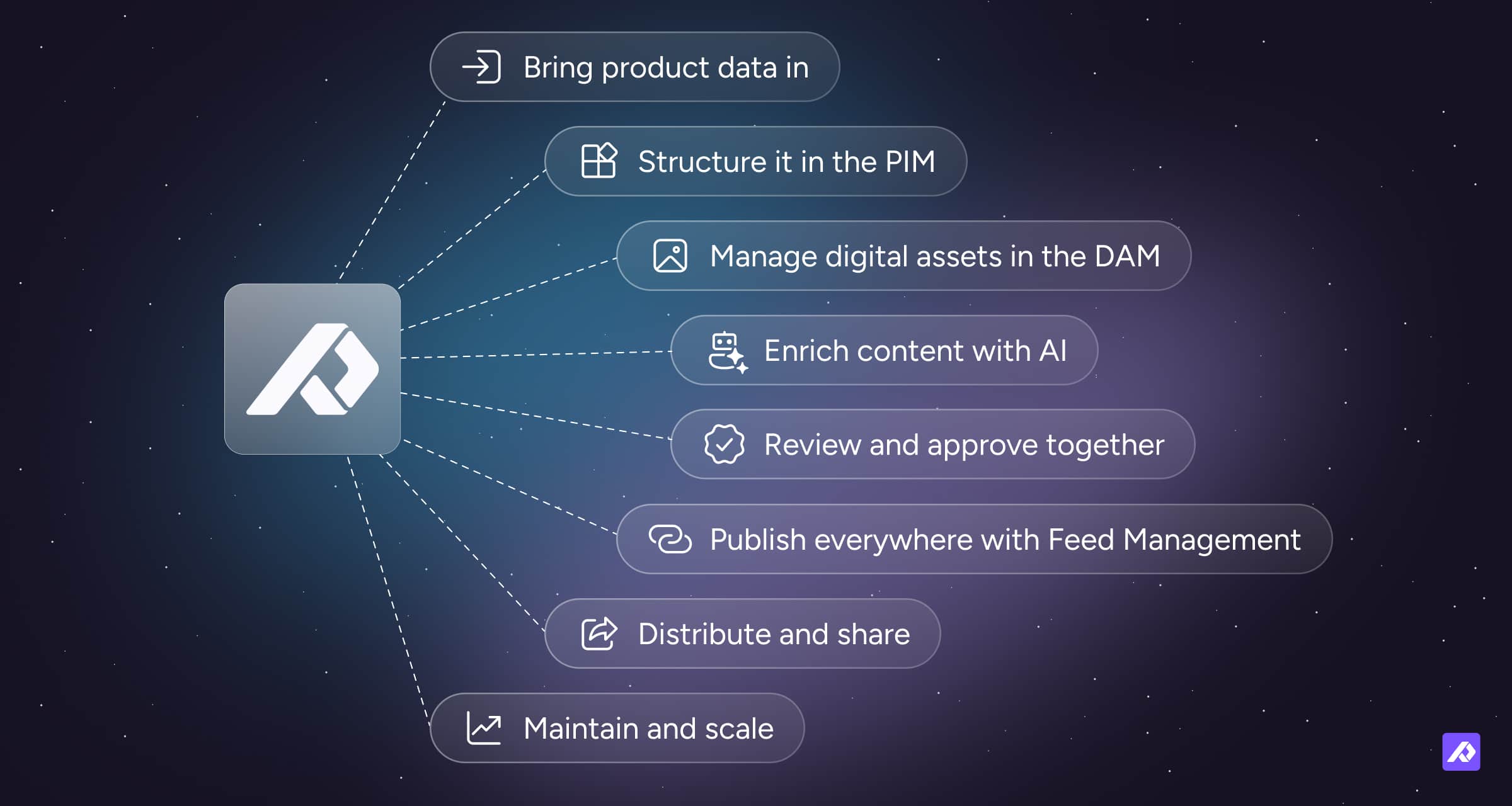
Step 1: Bring product data in
Plytix starts by centralizing what you already have. Teams can bring in product data from spreadsheets, supplier files, ERP exports, and ecommerce systems. For Shopify brands, Shopify Content Manager is specifically designed to help manage Shopify product catalogs, content, metafields, and localized updates across stores and markets.
Automated imports and sync workflows help keep product records current, so teams spend less time uploading files by hand and less time worrying about version confusion.
Step 2: Structure it in the PIM
Inside the Product Information Management (PIM) system, you define how your catalog is organized. This is where you set up products and variants, create the right attributes, organize those fields with Attribute Groups, and use Product Families to keep the right information tied to the right types of products.
This is also where governance starts to matter. User Roles and permissions help make sure the right people can edit the right information, so product content stays cleaner as more teams get involved.
This is the step where raw product data becomes manageable: structured, reusable, and consistent across your catalog.
Step 3: Manage digital assets in the DAM
Every product visual, video, or document can live inside the integrated Digital Asset Management (DAM) system.
Because assets stay tied to the products they belong to, teams spend less time digging through folders and less time guessing whether they are using the latest approved version. Built-in asset actions also help teams rename, resize, auto-format, and optimize files for the needs of different channels.
Step 4: Enrich content with AI
This is where structured product data starts turning into stronger product content.
With AI Content Studio, teams can create titles and descriptions, improve category or channel-specific copy, support translations across markets, and enhance visuals with AI-powered image tools. The point is not just to generate more content. It is to make product content clearer, more complete, and more useful wherever it appears.
That is an important difference. Plytix is not only helping teams manage product information. It is helping them improve it so it performs better across channels.
Step 5: Review and approve together
Before publishing, teams can check completeness and accuracy directly in Plytix. Features like Completeness Attributes help highlight missing information, while Team Comments keep feedback attached to the product itself instead of scattering it across email and chat.
That review flow matters because product content usually gets weaker when teams are working from disconnected files. When comments, permissions, and completeness checks live in the same place as the product record, approvals become much easier to manage.
Step 6: Publish everywhere with Feed Management
Once content is ready, Feed Management takes over.
That means teams can map product content to different destinations, including marketplaces, ad channels, webstores, and retail partners, while using transformations and formatting rules so each destination gets what it expects. The benefit is straightforward: one clean source of truth inside Plytix, with channel-ready outputs on the other side.
Step 7: Distribute and share
Beyond sales channels, Plytix also helps brands share approved content externally.
Brand Portals work as curated online catalogs where partners, customers, or internal teams can browse and export approved content through a live link.
Product Data Sheets let teams generate live, customizable product data sheets, spec sheets, and catalogs from structured product data.
Everything still comes from the same structured source, which helps keep shared content accurate and consistent.
Step 8: Maintain and scale
Because everything lives in one connected system, updates are simpler. When product data, assets, enrichment, review, and publishing are all linked, teams do not have to repeat the same update in multiple places.
This is where the model starts to compound. Improve product content once, and that improvement can flow across channels, markets, and shared materials. As you add more SKUs, variants, channels, and teams, the goal is not just to handle more data. It is to keep making product content better without adding the same level of operational drag.
The core loop: From data to growth
Plytix turns product content management into a repeatable loop:
- Centralize and structure your data
- Connect assets to the right products
- Enrich content with AI Content Studio
- Review and approve it with your team
- Publish and distribute it through Feed Management, Shopify Content Manager, Brand Portals, or Product Data Sheets
That is the practical model behind Content Led Growth: better product content, managed from one system, and reused across every place you sell.
Why teams like working this way
Plytix helps teams reduce duplicate work, but that is only part of the value. The bigger win is that it makes product content easier to improve and easier to scale.
A few reasons this model works well:
- Better product content: improve titles, descriptions, assets, and localization from one system
- More consistency everywhere: keep listings aligned across channels, markets, and teams
- Faster launches: move from raw data to publish-ready content with less manual work
- Stronger channel performance: send cleaner, more complete content to every destination
- Scalable growth: improve once, then reuse that improvement across your catalog
Final Thought
Plytix helps teams turn product data into better product content, then scale that content across every place they sell.
By bringing together PIM, DAM, AI Content Studio, Feed Management, Shopify Content Manager, Brand Portals, and Product Data Sheets, Plytix makes it easier to improve product listings, keep them consistent, and reuse that work across channels.
That is how Plytix works: it turns product content into one of your strongest growth engines.
Frequently Asked Questions
No. Plytix includes PIM, but it also includes DAM, AI Content Studio, Feed Management, and, for Shopify users, Shopify Content Manager, with add-ons like Brand Portals and Product Data Sheets.
Plytix helps teams centralize, structure, enrich, review, and distribute product content from one place, so content is easier to manage and more consistent across channels.
Yes. Plytix includes an integrated DAM for managing images and videos alongside product data, and it also supports externally shared materials through Brand Portals and Product Data Sheets.
Yes. AI Content Studio helps teams improve product text and images using AI.
Plytix uses Feed Management to create, optimize, and automate channel-ready product feeds for the places you sell.
Yes. Product, marketing, ecommerce, and operations teams can collaborate using shared product records, Team Comments, permissions, and completeness checks.
Because Plytix is designed as a connected product content system, updated product data can flow through connected publishing and sharing outputs instead of being manually recreated in multiple places.
Plytix supports growth by helping teams improve product content quality and reuse those improvements across every channel. Better titles, richer descriptions, cleaner assets, stronger localization, and more consistent listings can all contribute to better discoverability, stronger trust, and higher conversion.