
When Do You Need a PIM?
You usually need a PIM when product information starts slowing down launches, creating duplicate work, and causing confusion across channels.
This usually happens gradually. The old setup still technically works, but only because people keep patching it together with manual effort, workarounds, and memory.

TL;DR
- When you need a PIM: when each new SKU, channel, variant, market, or team handoff creates extra manual work.
- What the clearest signs are: selling across multiple channels, growing variant complexity, scattered digital assets, recurring launch delays, repeated reformatting for different destinations, and frequent confusion over which version of the data is current.
- What the real tipping point is: when your current setup still functions, but only because people keep correcting, checking, and re-entering the same product information.
- What to do with that signal: if three or more of the common warning signs apply to your team, it is time to evaluate PIM seriously. If five or more apply, the need is usually urgent.
Quick decision checklist
- You sell in more than one channel
- You manage variants, bundles, or localized versions of your products
- More than one team creates, edits, or approves product content
- Product assets live re spread across folders, shared drives, or links that break
- Product launches slow down because of missing fields or formatting issues
- You keep asking which version of the product data is the most current
- Updating one product means updating it again in several places
- You need a clearer view of what is complete and what is still missing
If several of these feel familiar, a PIM is probably worth serious consideration. If most of them do, the need is usually urgent.
Signs you need a PIM
There is no single number that determines when you need a PIM. Still, some thresholds are worth knowing because they show the point at which manual coordination starts compounding into a real operational cost.
| Threshold | Usually still manageable without PIM | Usually a strong signal it is time to get a PIM |
|---|---|---|
| SKU count | Fewer than 100 stable SKUs | 100+ SKUs, especially with frequent changes or additions |
| Channels | One main channel | 3+ channels, feeds, retailers, or marketplaces |
| Team contributors | One main editor | 5+ people touching product content across teams |
| Variants | Simple size or color sets | Variant families, bundles, kits, parent-child logic |
| Markets | One language, one region | Multiple markets, translations, units, or compliance rules |
| Assets | Simple folder structure | Images, manuals, videos, and docs scattered across systems |
| Threshold | Usually still manageable without PIM | Usually a strong signal it is time to get a PIM |
|---|---|---|
| SKU count | Fewer than 100 stable SKUs | 100+ SKUs, especially with frequent changes or additions |
| Channels | One main channel | 3+ channels, feeds, retailers, or marketplaces |
| Team contributors | One main editor | 5+ people touching product content across teams |
| Variants | Simple size or color sets | Variant families, bundles, kits, parent-child logic |
| Markets | One language, one region | Multiple markets, translations, units, or compliance rules |
| Assets | Simple folder structure | Images, manuals, videos, and docs scattered across systems |
What matters is not one threshold by itself. What matters is when several appear together. That is usually when the work begins to slow the business down.
The clearest signs you need a PIM
You usually need a PIM when your team is no longer dealing with one isolated issue, but with a repeating pattern of avoidable product-content work that keeps pulling time and attention away from higher-value tasks.
1. Your spreadsheets have quietly become a fragile system
Spreadsheets are often the right place to start. They are fast, familiar, and flexible.
The problem is that they do not scale cleanly with catalog complexity. One sheet becomes several. Then come exports, duplicate files, workaround tabs, and formulas only one person understands.
At that point, the spreadsheet is no longer just a tool. It is infrastructure. And not especially reliable infrastructure.
When your team is spending meaningful time maintaining the system instead of using it, that is a strong sign it is time to move on.
2. You sell in multiple channels and keeping them aligned is getting painful
Multi-channel selling changes the problem fast.
A single product now has to work on your website, in marketplaces, in retailer templates, in feeds, and sometimes in sales sheets or PDFs. A small update no longer stays small. It has to be repeated everywhere.
One changed attribute becomes several follow-up edits. One missing field becomes several channel errors. One mismatch becomes inconsistent listings customers can actually see.
That is where manual maintenance starts growing faster than the catalog itself.
3. Variants are multiplying faster than your process can handle
Variants add complexity quickly.
Shared values get copied too many times and fall out of sync. Child-level fields get overwritten at the wrong level. Product families that looked tidy at first turn into row-management exercises that depend on constant human judgment.
This is where the difference between storing rows and managing product relationships starts to matter. If your system cannot model parent-child structure, inheritance, and bundle logic cleanly, the team ends up carrying that complexity manually.
That rarely scales well.
4. Multiple teams touch the data and no one fully trusts the latest version
This is one of the strongest signals that a PIM is needed.
When ecommerce, marketing, sales, product management, and operations all contribute to or depend on product information, the challenge stops being about data storage and becomes a coordination problem. Teams work from different files. Edits get made in isolation. The "final" version becomes a matter of opinion rather than fact.
A PIM addresses this directly by creating a single source of truth: one place to work, one structure to follow, and one clearer view of what is ready and what is not.
5. You keep finding gaps right before launch
Missing images. Incomplete descriptions. Wrong specs. Broken links. Last-minute formatting issues.
These are almost always symptoms of a process that relies too heavily on individual memory, heroic last-minute checking, and launch timelines that leave no room for error.
When launch readiness is difficult to see until the end, with no reliable completeness tracking earlier in the workflow, the process is already costing more than it should.
6. Assets are scattered and hard to trust
A surprising amount of product work is really file retrieval.
Images in one folder. Manuals in another. Certificates somewhere else. Packaging art in a shared drive. One important file attached to an email from eight months ago.
That setup can work when the catalog is small and the team is small. But once assets need to stay reliably connected to specific products, variants, channels, and approval states, manual file matching becomes a significant source of unnecessary labor and error.
7. Market, retailer, or compliance requirements are getting heavier
The more destinations you support, the more structure you need.
That can mean:
- translated content
- market-specific units
- retailer-specific fields
- certificates and compliance documents
- channel-specific formatting
- region-specific product rules
At that point, the issue is no longer just storing information. It is keeping it consistent, traceable, and formatted correctly for each destination.
That is a problem far better suited to a system than to a patchwork of spreadsheets, shared folders, and manual processes.
8. Every improvement has to be repeated manually
This may be the simplest and most telling test of all.
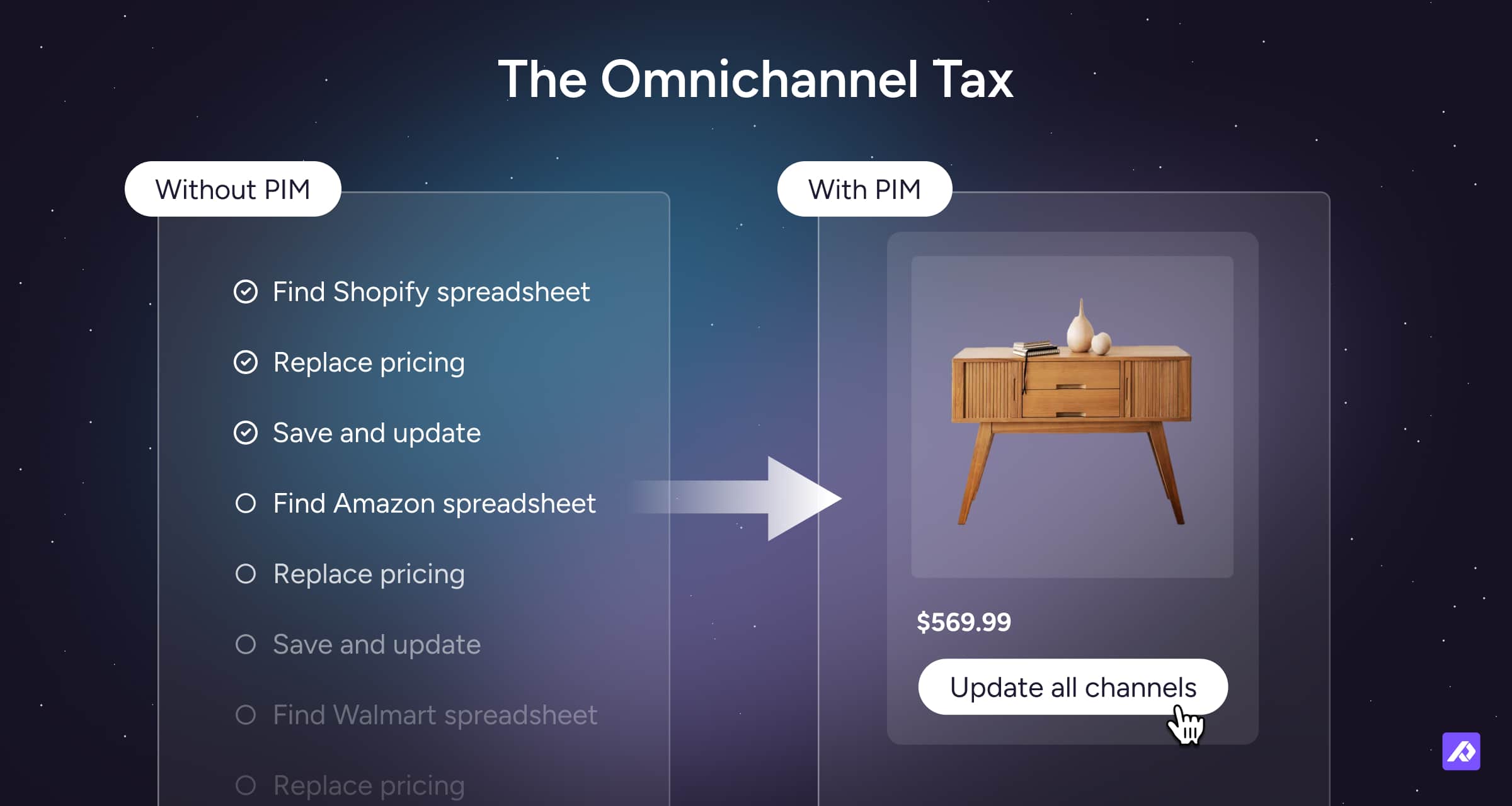
If every product update has to be copied into several places, reformatted for several channels, and checked by several people, your setup is not scaling with the business.
It is leaking effort at every step. Time that should compound into catalog quality instead gets consumed by repetitive, low-value duplication work.
That is usually the clearest practical signal that a PIM has moved from "nice to have" to genuinely necessary.
Timing triggers that usually push the decision
Most companies do not buy a PIM because of a vague future need. They typically make the decision because something in the business changes and the existing process can no longer keep up.
The most common triggers are:
- entering new markets
- adding new channels
- growing the catalog
- increasing variant complexity
- adding more contributors
- merging supplier data from more sources
- replatforming
- trying to launch faster
In each case, the pattern is the same. The business changes first. The product-content process falls behind second.
Some teams do not recognize this as a PIM moment right away. They describe it as needing a better product database, a more centralized catalog, or one place where people can browse and trust the latest product information.
That is often the signal. When the real problem is no longer storing product data, but organizing and sharing it in a usable way at scale, a PIM usually becomes the right next step.
Signs you can still wait
Not every company needs a PIM right away.
You do not need a PIM just because your setup is imperfect. You need one when keeping product information accurate and ready to sell starts taking too much extra work.
You may not need a PIM yet if:
- updating product information is still fairly quick
- one person can manage the catalog without constant handoffs
- you are mainly selling through one channel
- product files and images are easy to find
- it is usually clear which product information is current
- new products can be prepared without much back-and-forth
- the team is not spending much time reformatting the same data for different places
That is usually the real distinction.
If the setup is simple and stable, you may not need a PIM yet. If it feels fragile, patchy, or increasingly dependent on workarounds, you probably do.
What happens if you wait too long?
Usually, nothing dramatic happens at first.
You just get slower.
The team spends more time checking files, repeating updates, and fixing inconsistencies (death by a thousand manual updates).
That is what makes the problem easy to underestimate. Teams often keep hobbling along with processes that technically still function, even though those processes are already limiting speed, clarity, and scale.
They wait longer than they should because the system creates friction, not failure, and friction is easy to postpone.
Eventually, the weakness becomes visible in ordinary moments such as:
- A failed handoff: a new team member cannot tell which file is current or how the catalog is meant to be maintained.
- A rejected submission: a retailer or marketplace sends product data back because the format or structure is not reliable enough.
- A scaling slowdown: one more channel or market creates enough extra coordination work that the process starts to strain.
That is usually the real risk of waiting too long. The process becomes harder to trust, harder to hand over, and harder to scale.
Teams often wait longer than they should because nothing has visibly broken yet. That is the trap. By the time something does break, whether that is a retailer suspension, a bad launch, or a key person leaving, the cost of waiting has often already been paid many times over.
What a PIM does not fix
A PIM helps with an important layer of the problem. It does not fix every layer.
| A PIM helps with… | A PIM does not automatically fix… |
|---|---|
| Product content structure and consistency | Bad upstream data governance across the entire business |
| Channel formatting and syndication | Every ERP, finance, or inventory use case |
| Variant modeling and asset alignment | Weak internal decision-making |
| Completeness tracking and workflow visibility | Every creative workflow a dedicated DAM might handle |
| Team collaboration on product data | Instant data cleanliness without setup and cleanup work |
That distinction matters. A PIM is not meant to replace every system around product data. It is meant to improve the messy layer between them.
How long PIM implementation usually takes
PIM implementation usually starts delivering value faster than teams expect, especially when they begin with one high-priority part of the catalog instead of trying to clean and migrate everything at once.
For many teams, the first useful phase can happen within weeks. A broader rollout usually takes longer. For a deeper breakdown of typical rollout phases and timing, see our PIM implementation timeline benchmarks.
The biggest factor is rarely the software itself. It is how much cleanup, structure, and alignment the team tries to take on at once.
Quick self-diagnostic quiz
If you answer “yes” to three or more, it is time to look seriously at PIM.
- Do we sell the same products in more than one channel?
- Do multiple teams edit, approve, or depend on product content?
- Do we manage variants, bundles, or localized versions?
- Do updates to one product often need to be repeated in several places?
- Do we regularly ask which version of the product data is correct?
- Do launches get slowed down by missing fields, assets, or formatting work?
- Are product assets stored separately from product data across folders, drives, or documents?
- Is it hard to see what is complete and what is still missing before launch?
- Do retailer, marketplace, or market-specific requirements create repeated manual cleanup?
Scoring guide
- 0–2 yes: You may not need a PIM yet
- 3–4 yes: You are likely approaching the tipping point
- 5–6 yes: A PIM is probably overdue
Final Thought
You need a PIM when the work required to keep product information accurate, complete, and ready to sell is no longer staying manageable on its own.
In practice, that usually means some combination of multi-channel selling, variant complexity, scattered assets, repeated updates, launch friction, and version confusion.
That is the point where spreadsheets stop being a useful tool and start becoming a bottleneck. When that happens, Plytix gives teams one place to manage product information, assets, and channel-ready content without relying on spreadsheets to hold everything together.

Frequently Asked Questions
Yes, you may still need a PIM even if you already have an ERP.
An ERP usually handles operational data like inventory, pricing, purchasing, and orders. A PIM handles the product content needed to sell accurately across channels.
No, there is not really a fixed minimum SKU count for needing a PIM.
SKU count matters, but channel count, variant complexity, team involvement, and how often your product data changes usually matter just as much.
The biggest sign you need a PIM is that product information stops feeling straightforward and starts feeling like a recurring coordination problem.
If the team keeps repeating updates, chasing the latest version, and fixing issues right before launch, you are probably past the point where manual management is working cleanly.
Yes, you can sometimes wait even if you are still using spreadsheets.
Spreadsheets are often the right starting point. The issue is not whether spreadsheets are bad. The issue is whether they are starting to behave like a fragile product-content system that depends on workarounds, duplicate files, and manual checking.
Most teams start seeing value from a PIM sooner than they expect.
The first gains usually come from getting product data into one structured system, reducing repeated manual work, and making it easier to see what is complete and ready to publish.