
How Much Does a PIM Cost in 2026? (And What Are You Really Paying For)?
TL;DR
- Most PIM (product information management) systems cost between $0 and $50,000+ per year, depending on pricing model and complexity.
- SaaS PIMs usually have more predictable costs; open-source PIMs (and self-hosted PIMs) often hide more cost in setup and maintenance.
- The biggest cost drivers are SKUs, variants, users, integrations, support, and add-ons.
- The cheapest PIM is not always the most cost-effective.
- Compare total cost of ownership, not just the monthly fee.
PIM Pricing at a Glance
| Pricing band | Typical monthly cost | Typical fit | Common triggers for moving up |
|---|---|---|---|
| Starter | Free to low-cost | Small catalogs, simple product structure, one main sales channel | More SKUs, more users, more channel requirements |
| Growth | Low hundreds to low thousands | Growing catalogs, more variants, multiple channels, more team collaboration | Integrations, workflow needs, asset volume, advanced outputs |
| Enterprise | Low thousands to tens of thousands+ | Large catalogs, multiple markets, governance, localization, complex workflows | Regional complexity, compliance, support needs, custom integrations |
Most PIM pricing falls somewhere between $0 and $50,000 per year, which is admittedly a pretty wide range.

That range exists for a reason. Some PIMs are simple to get started with. Others ask a lot more of your budget, your team, or both. Some are cloud-based, some are self-hosted. Some charge a lower monthly fee but add costs through implementation, advanced usage, or add-ons. Others charge more upfront and include more in the base plan.
So the real question is not just what a PIM costs. It is what you are actually getting for your money.
A cheap PIM that does not help you move faster or reduce errors is not much of a bargain. A more expensive PIM can still be the better deal if it shortens time to market and gives your team a cleaner, less chaotic way to manage product information.
If you are still early in the process, our guide on how to choose a PIM is a useful next step before you get too deep into pricing comparisons.
Types of PIMs and How They Charge
One reason PIM pricing feels hard to compare is that many vendors do not publish clear public pricing, especially at the enterprise end of the market.
To compare PIM pricing properly, it helps to understand the two most common pricing structures: SaaS and Open-source.
Where the PIM is hosted, and whether you pay a subscription fee, a license fee, or a support contract, will affect both the visible cost and the hidden one.
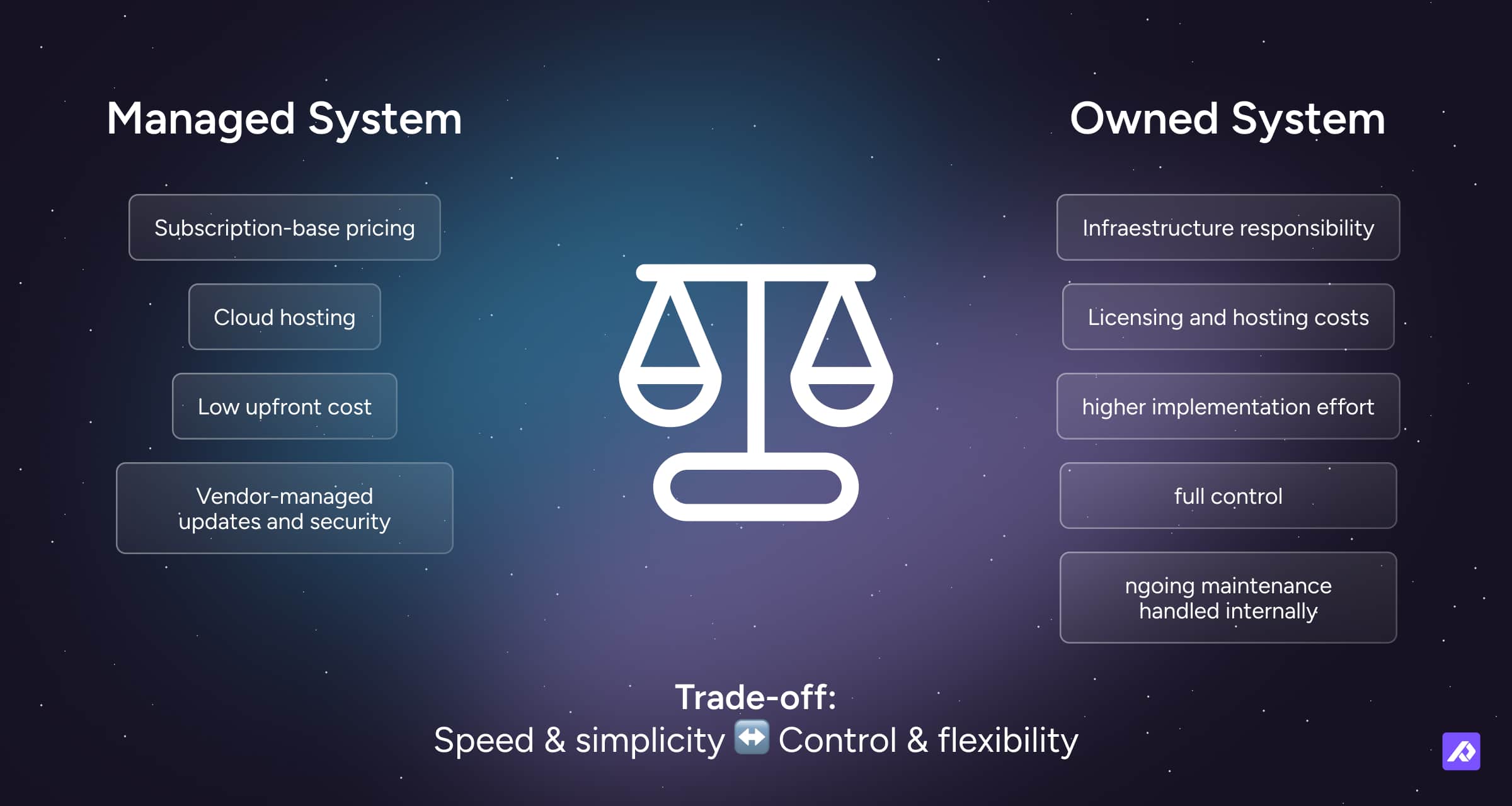
SaaS PIM Pricing
SaaS PIMs charge a monthly or annual subscription fee and are the most common option for small and mid-sized businesses. You access the software via the cloud, and plans are typically tiered by usage, scale, or feature access.
How do you license the PIM software?
Pay a subscription fee.
Where is the software hosted?
In the cloud.
Typical pricing models
- Free: A small number of PIMs offer a basic or reduced version of their platform for free.
- Tiered subscriptions: You pay monthly or annual fees. Lower tiers usually include fewer features, fewer users, or fewer products.
- Usage-based pricing: Pricing depends on usage metrics like data volume, SKUs, outputs, or API activity.
- Custom enterprise pricing: Pricing is tailored to businesses with more complex setup, governance, or support needs.
Additional costs
- Implementation or onboarding: Some SaaS PIMs charge a one-off setup fee that includes account setup, onboarding, or training.
- Add-ons: Extra features like advanced outputs, portals, datasheets, analytics, or richer DAM functionality may cost extra.
- Higher usage: Exceeding included limits for assets, outputs, users, or processing can move you into a higher tier or trigger usage-based charges.
If you are evaluating Plytix specifically, it helps to look at the base plan, credits, and add-ons separately rather than treating it as one flat number. That is exactly what Plytix pricing and plans covers.
Open-Source PIM Pricing
Open-source PIMs may look cheaper upfront, but the total cost often depends on hosting, customization, maintenance, and technical support.
They can be a strong fit for businesses with complex requirements and the technical capacity to support them, but they also tend to bring more implementation time and more ongoing overhead. In other words, they are rarely the cheap-and-easy option.
How do you license the PIM software?
It can be free, or you pay a one-off fee.
Where is the software hosted?
It can be hosted on-premise, in the cloud, or in a private cloud.
Typical pricing models
- Free core software: Downloading the software costs nothing.
- License fees: Some open-source PIMs still require a license fee.
- Paid support: Professional support, hosting, or enterprise features are often sold separately.
- Support contracts: Some businesses rely on paid vendor or partner support to keep the system running smoothly.
Additional costs
- Customization: You will usually need a dev team to set up and tailor the PIM to your needs.
- Ongoing maintenance: Updates and security patches need to be managed internally or through a third party.
- IT personnel: You may need additional staff, contractor support, or an agency to manage maintenance.
- Infrastructure: If you are hosting the software yourself, hardware, storage, networking, and related costs need to be factored in.
SaaS vs. Open-Source PIM: What’s Included in the Cost?
| Cost area | SaaS PIM | Open-source PIM |
|---|---|---|
| Hosting | Usually included | Usually separate |
| Maintenance | Usually included | Usually managed internally or by a partner |
| Updates | Usually included | Often handled by your team |
| Setup effort | Usually lower | Usually higher |
| Customization | More limited | Usually more flexible |
| Technical ownership | Lower | Higher |
| Cost predictability | Higher | Lower |
SaaS tends to keep more of the cost inside the subscription. Open-source often pushes more of it into implementation, customization, technical ownership, and maintenance.
The best type of PIM for your business comes down to, well, your business: whether you have in-house developers, how many products you manage, and how fast you plan to grow. You do not want to invest in a system only to outgrow it in a year, but you also do not want to buy something far heavier than you need.
The good news is that once you understand how different PIMs are built, and how that affects pricing, it becomes much easier to compare your options.
If part of your pricing question is really about who will own setup and rollout, it helps to think through whether this is something you want to handle with a partner or DIY.
What Are You Really Paying For in a PIM Software?
A PIM is more than a prettier spreadsheet. At its best, it is the system that stops product information from turning into a recurring headache.
So the price is not just about access to software. It usually reflects several layers of cost:
| Cost component | What you're paying for |
|---|---|
| Subscription | Access to the PIM platform and core features |
| Setup and implementation | Data migration, structure, configuration, workflows, integrations |
| Training and support | Onboarding, enablement, ongoing help |
| Customization or extensibility | Tailoring workflows, outputs, or connections to your needs |
| Maintenance and updates | Platform improvements, security, and ongoing upkeep |
| Scalability | The ability to support more SKUs, users, channels, and complexity over time |
Some providers bundle these into a flat monthly fee. Others break them out into separate line items. Either way, the important thing is understanding what is included and what is not.
This is also why two tools that look pretty similar in a demo can feel very different once the quote arrives.
What Affects the Total Cost of Ownership (TCO)?
To budget for a PIM properly, you need to look at total cost of ownership, not just the monthly fee.
Here is what usually drives that total cost up, or keeps it manageable:
| Cost driver | Lower-cost situation | Higher-cost situation |
|---|---|---|
| Users | One or two people manage data | Multiple teams and external collaborators need access |
| SKUs | Smaller, stable catalog | Large catalog with many products and frequent changes |
| Variants | Simple product structure | Many sizes, colors, bundles, technical specs, or regional variations |
| Integrations | Few or none | ERP, ecommerce, DAM, API, or custom system connections |
| Data volume | Limited assets and content | Large image libraries, PDFs, videos, localization, channel-specific content |
| Customization | Mostly out-of-the-box use | Significant tailoring, custom logic, or special workflows |
| Features and services | Core platform use | Advanced outputs, analytics, onboarding, support, portals, automation |
Number of users
Many SaaS PIMs charge per user or cap the number of users on each plan. That matters more once multiple teams need access, such as ecommerce, product, marketing, sales, agencies, or distributors.
Number of SKUs
Whether you manage 500 or 500,000 products, many PIMs scale pricing based on volume, especially those using tiered or usage-based pricing.
Variants and product complexity
More SKUs do not always mean more complexity. A catalog with many variants, bundles, technical specs, or market-specific differences usually needs more robust structure and workflow.
Integrations
Connecting your PIM to marketplaces, ERPs, ecommerce platforms, CRMs, or DAM systems may cost extra. Some SaaS tools include certain integrations depending on the plan. Open-source and self-hosted systems often require more custom API work.
Volume of data
Images, PDFs, videos, localized content, and channel-specific content all take up storage and increase processing needs. Some SaaS plans include limits, and going over them may require upgrading or paying more.
Features, support, and services
Advanced features like channel-specific feeds, portals, analytics, localization, onboarding, or priority support may cost extra or only appear in higher tiers. This is why it helps to look past the headline price and ask what is actually included.
What ROI Should You Expect from a PIM?
A PIM is worth the price when it helps your business work faster, publish better product content, and grow more efficiently.
A good PIM creates ROI in two ways:
- money saved through less manual work, fewer errors, and less rework
- money gained through faster launches, better listings, and broader channel reach
This is easiest to understand when you stop thinking about ROI as a spreadsheet, and instead see it as a system.
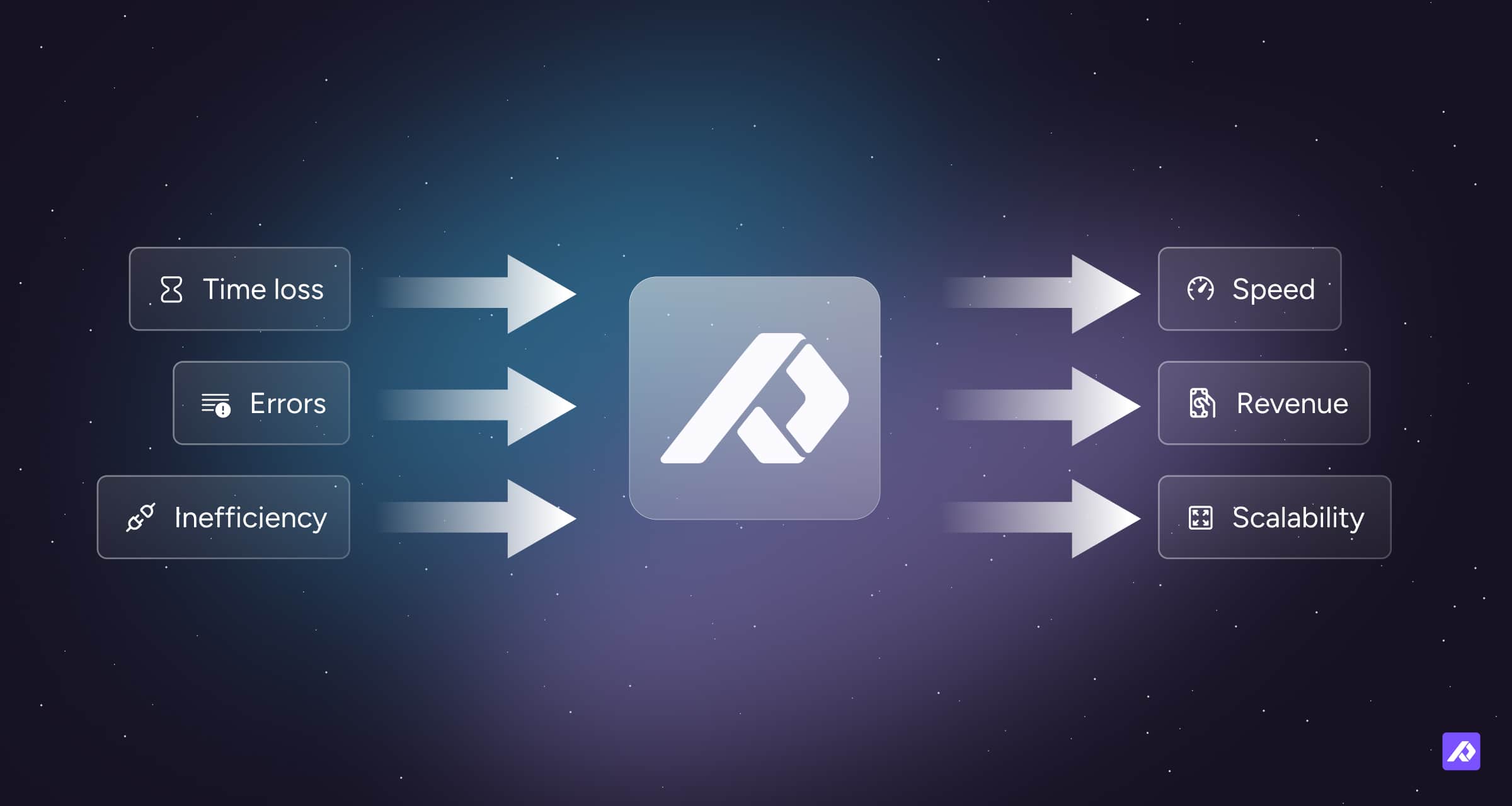
But the strongest ROI cases are not just about efficiency. They are about turning product content into a more reliable growth asset.
When product information is complete, consistent, and easy to adapt, it becomes much easier to launch faster, expand into new channels, support partners better, and improve conversion with stronger listings. In other words, better product content does not just reduce internal headaches. It helps the business get more value from every product it already sells.
To estimate ROI, look at:
- time saved on product updates, cleanup, and channel formatting
- errors avoided, such as listing issues, returns, and rework
- revenue gained from faster launches and better-performing product content
A simple example: if your team spends dozens of hours each week fixing spreadsheets and formatting content, even a partial reduction in that work can offset a meaningful part of the PIM cost.
Hidden Costs to Watch Out For
The visible price is not always the full price. Some of the most common hidden costs show up after the buying decision, not before it.
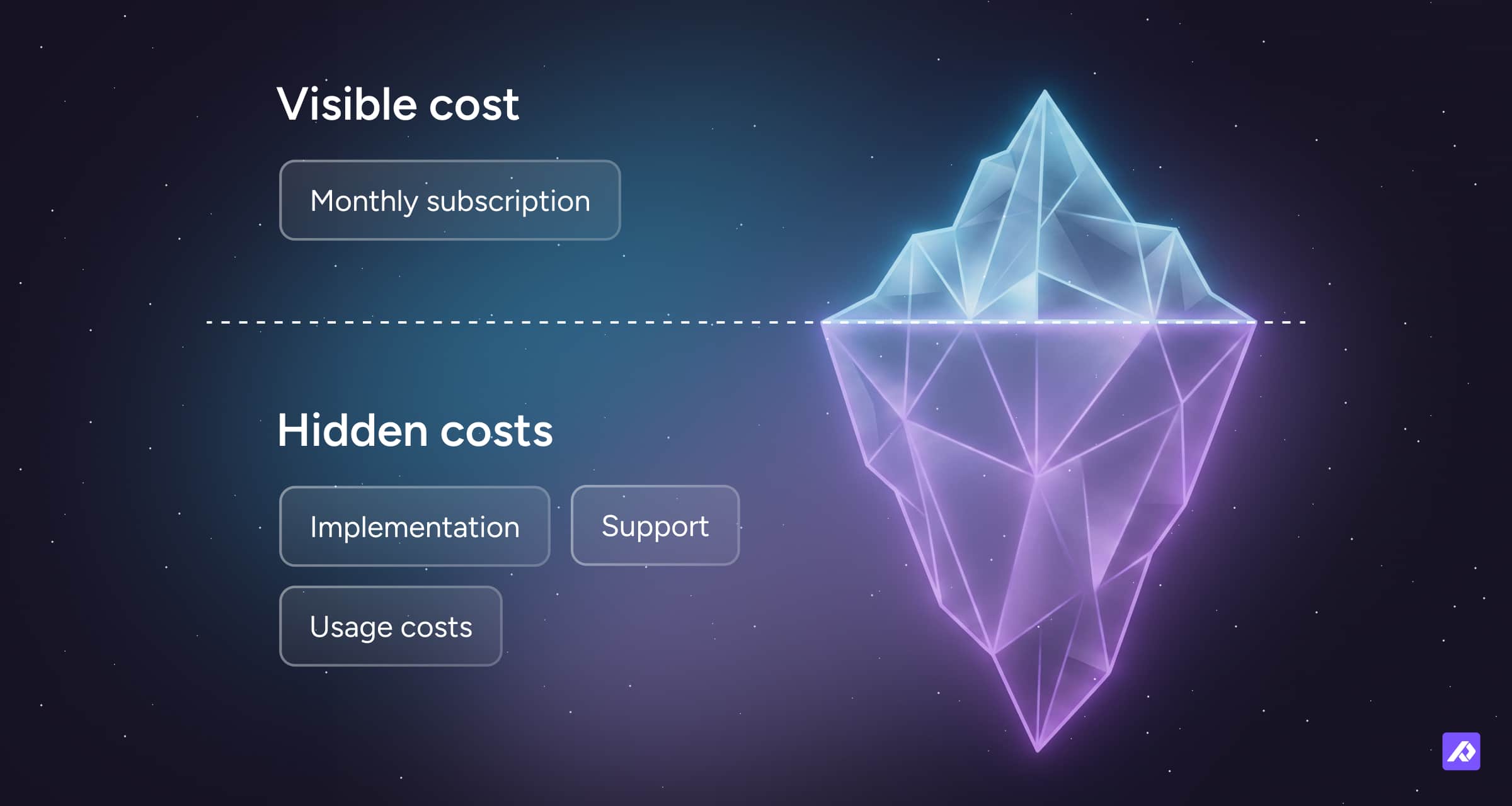
Watch out for:
- data migration and cleanup fees
- custom development for integrations or workflows
- overage charges for SKU, user, asset, or usage limits
- premium support tiers
- API or sync limits
- internal rollout time that never appears on an invoice
None of these are unusual. But they should be part of the evaluation. A tool that looks cheaper at the top line can still become more expensive once these costs start to appear.
This is usually where “cheap” starts turning into “surprisingly labor-intensive.”
How to Compare Product Information Management (PIM) Pricing
When you compare PIM pricing, look beyond the monthly fee and ask what is actually included, what is capped, and what extra work your team will still need to do.
Define your needs
List your must-haves, nice-to-haves, current complexity, and likely next-stage needs.
Set a budget
Know how much you are willing to invest and what kind of return you expect.
Book demos
Test a few PIMs to see how user-friendly they are, how they handle your type of data, and whether the workflow fits your team.
If you are moving beyond a basic demo and into serious evaluation, a more structured process helps, which is exactly what the PIM Demo + PoC Playbook is for.
Get full quotes
Ask for a breakdown of what is included in the base price, which features cost extra, what is capped, and what onboarding and support are included.
Check support
Find out what kind of help is available during and after rollout.
Read reviews
See what real users say on platforms like G2 or Capterra.
Consider growth
Make sure the PIM has room for more products, more users, more channels, and more complexity.
The goal is not just to find a lower number. It is to find a pricing model that still makes sense once your catalog, team, and channel mix get more complicated.
Final Thought
There is no single answer to how much a PIM costs, but there is a clear way to judge whether the cost makes sense for your business.
It depends on the pricing model, the type of PIM, the complexity of your catalog, the number of users and channels, and the features and services your business actually needs.
One thing is consistent: the cheapest option is not always the most cost-effective. If you end up spending extra time and money to make a cheaper PIM work, it probably was not such a bargain after all.
The right PIM should be priced in a way that matches your growth and delivers real value from day one.
If you are already comparing Plytix specifically, the next best step is to look at Plytix pricing and plans rather than trying to squeeze product-specific detail out of a market-wide pricing guide.
Frequently Asked Questions
Most PIMs cost anywhere from $0 to $50,000 per year, depending on the pricing model, complexity, number of users, channels, and add-ons. SaaS PIMs often have clearer subscription pricing, while open-source and enterprise options can shift more of the cost into setup, customization, and support.
Most PIM vendors do not show pricing publicly because the quote often depends on your catalog size, number of users, integrations, support needs, and rollout scope. In practice, that means two companies looking at the same platform can get very different pricing based on how much complexity they bring.
The costs most often left out of the headline PIM price are implementation, data cleanup, onboarding, custom development, add-ons, and usage-based charges. A tool can look affordable at first, then become much more expensive once setup work, support needs, or overage costs start to show up.
A PIM pays for itself when the time saved, errors avoided, and revenue gained are worth more than the total cost of the system. The clearest signs are usually faster product launches, less manual cleanup, fewer listing mistakes, and better product content across channels.
You can see Plytix pricing on the Plytix pricing and plans page.
Unlike many PIM providers, Plytix pricing is public and modular. You can see what is included, what can be added, and how credits work before talking to sales. Every plan includes unlimited users and monthly billing, with no long-term commitment.