
How to Name and Structure Product Attributes in a PIM
By the Plytix Team · Updated May 15, 2026
TL;DR
- What they are: Attributes are the individual pieces of information that turn a physical product into something your ecommerce systems can understand, manage, and publish online.
- Why they matter: Clear names, correct field types, and logical grouping keep data consistent, reduce user error, and make imports, exports, and channel mappings much easier to manage.
- What good setup looks like: Use product attribute naming best practices with a consistent naming convention, separate shared data from channel‑specific data, generate values automatically where rules can handle them, and design a clear attribute model that scales with your channels and team.
- This article is for you if: your catalog is growing, multiple teams touch product data, or channel-specific fields are starting to multiply.
What Are Attributes?
If you want to sell a physical product online, you have to turn that product into information.
A customer cannot hold the product in their hands on your website, marketplace listing, print catalog, or product feed. So instead, your business has to describe it clearly enough for systems, teams, and channels to understand what it is, how it differs from other products, and how it should be displayed or sold.
That is what attributes do.
Attributes are the individual pieces of information that translate a real-world product into digital product data. Things like:
- Product name
- SKU
- Color
- Size
- Material
- Weight
- Description
- Primary image
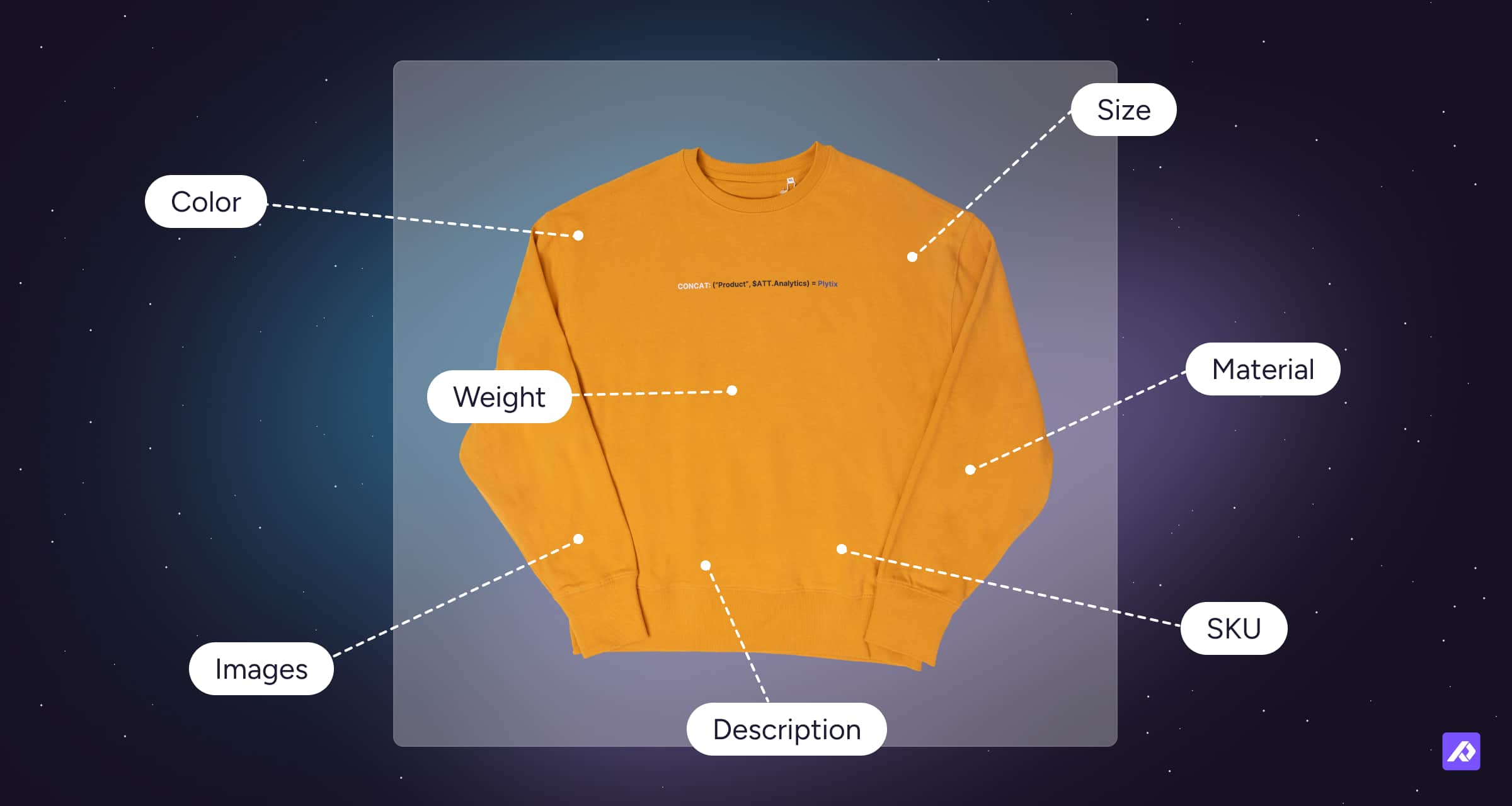
In simple terms, attributes are how a physical product becomes something your ecommerce stack can work with.
Some attributes describe the product itself, like size, material, or weight. Others describe how the product is presented, sold, or managed across channels, like title, description, certifications, launch date, or hazardous material status.
A Simple Way to Think About Attributes: BAR
Once you start building out attributes, a new question comes up: what role is each field actually supposed to play?
Some fields describe facts that stay true no matter where the product appears. Some exist because a specific channel, market, or team needs a different version. Others do not need to be maintained by hand at all because they can be generated from data you already trust.
This is also where spreadsheets often start to struggle, because they can store fields but do not naturally separate shared product truth, channel-specific adaptations, and rule-based values.
A useful way to think about attribute structure is to group fields into three roles. We call it BAR:
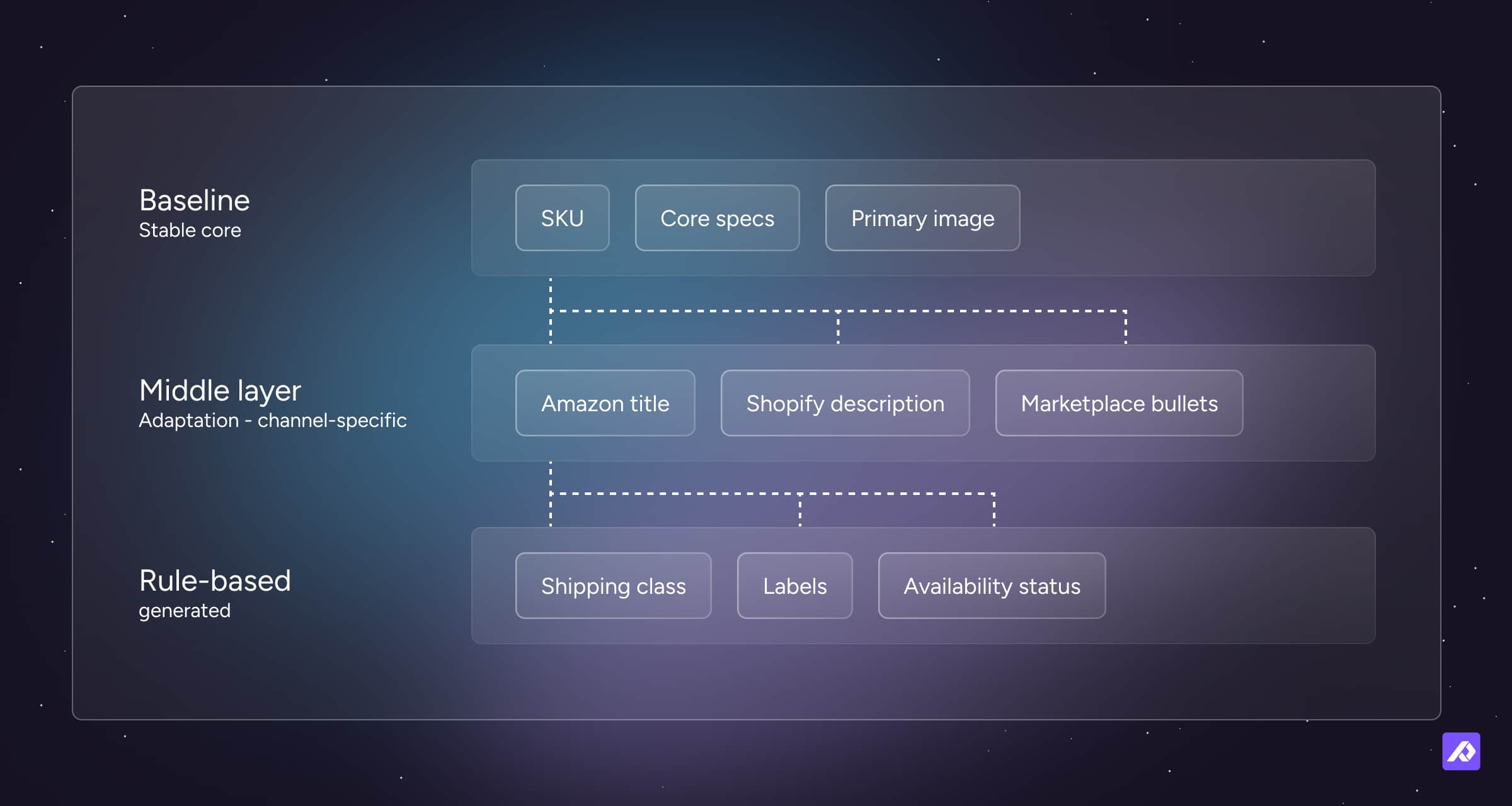
Baseline
Information that is true regardless of channel and should be defined once, then reused everywhere. Examples: SKU, core specifications, primary images.
Adaptation
Information that changes for a specific channel, market, or use case. Examples: Amazon title, webshop title, marketplace-specific bullet points.
Rule-based
Information that can be generated automatically from trusted inputs, rather than maintained by hand. Examples: shipping class from weight and dimensions, availability labels from inventory rules.
This framework helps teams avoid one of the most common PIM mistakes: mixing shared data, channel-specific data, and generated data into the same bucket.
If a webshop title and an Amazon title are different, they are not the same attribute. The moment one field is changed for a specific channel, it becomes an adaptation.
If a value can be generated reliably from trusted source data, it usually should be. Every field a human maintains manually is another chance for inconsistency.
Teams often discover that their attribute model is larger than it needs to be. Not because they have too much information, but because they have duplicated the same concept across channels, teams, or workflows. Once baseline, adaptation, and rule-based fields are separated clearly, the model often becomes smaller, cleaner, and easier to maintain.
Attribute Types
BAR explains the role an attribute plays in your model. Attribute types answer a different question: what kind of value does this field hold?
Choosing the right type matters. Wrong types lead to messy data, inconsistent formatting, and more cleanup later.
Here is a reference of common attribute types, including the ones available in Plytix:
| Attribute Type | What It’s For | Example Use Case |
|---|---|---|
| Short Text | Short text fields | Product Name, SKU, Country |
| Paragraph | Longer text fields | Product Descriptions, Care Instructions |
| HTML | Rich text | Long descriptions for ecommerce |
| Integer | Whole numbers | Quantity, Count, Weight (g) |
| Decimal | Numbers with decimals | Price, Weight (kg) |
| Dropdown | Single selection from a fixed list | Color, Material, Size |
| Multi-Select | Multiple selections from a fixed list | Compatible Sizes, Markets |
| Date | Calendar dates | Launch Date, End-of-Life |
| URL | External links | Manual, Supplier Page |
| Boolean | Yes/No | Discontinued, Hazardous |
| Media (Single) | One file | Primary Image |
| Media Gallery | Multiple files | Packshots, Lifestyle Images |
| Completeness | Tracks record completeness | Website Ready |
| Formula Attribute | Calculated from other attributes | Display Name = Brand + Product Name |
As a rule, choose the most structured field type possible. If a field should only contain one value from a fixed list, use a dropdown instead of free text. If it should hold a number, use integer or decimal. The more structure you build into the model, the fewer data issues you create later.
If attribute flexibility is one of your key buying criteria, make sure it is part of your PIM evaluation from the start. Our guide to choosing a PIM explains what to compare before you commit.
Why Naming and Structuring Attributes Matters
Keeps Data Consistent
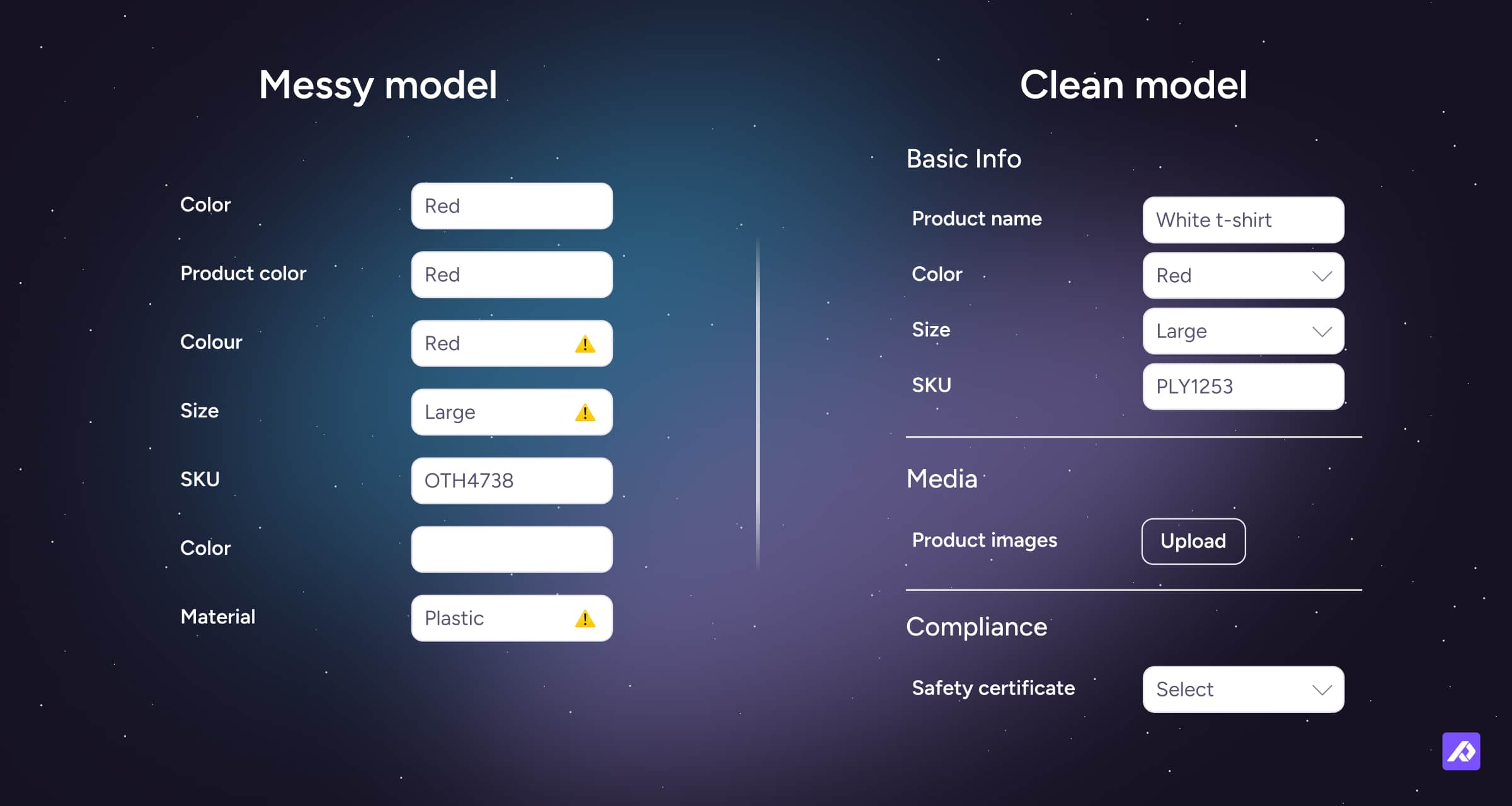
Consistent names prevent duplicates like “Color” and “Product Color,” reducing confusion and avoiding conflicting values in imports, exports, and day-to-day maintenance.
Improves User Adoption
When attributes are clearly named and logically grouped, new team members can understand and work in the PIM faster. That reduces training time and lowers the number of internal support questions.
Reduces Data Entry Errors
Well-chosen types, such as dropdowns, decimals, and booleans, guide users toward valid values. That lowers the chance of typos, inconsistent formats, missing information, and messy free-text entries.
Supports Automation
Standardized attributes let import profiles, formulas, transformations, and mappings run reliably without constant manual fixes.
Simplifies Integrations
Clear names make it easier to map your data to ERP systems, ecommerce platforms, syndication tools, and marketplaces without second-guessing what each field is supposed to contain.
Align Attributes With Your Channels
When you export product data to Shopify, Amazon, retail feeds, or print workflows, clear and consistent attribute names make mapping much easier.
A simple best practice is to create an attribute mapping layer, even if it is just a spreadsheet, that maps your PIM attribute names like title, description, color, and weight_kg to each channel’s required field names, such as product.title, amazon.product_description, or amazon.variation.color.
Keep your PIM attribute names stable and generic, such as sku, brand, and price, so that new channels or field updates only require a mapping change, not a schema overhaul.
Enables Growth
Structured attributes scale with your business. They make it easier to add new products, teams, channels, and regions without rebuilding your model every time the business expands.
Common Signs Your Attribute Model Is Breaking Down
Most teams do not realize their attribute structure is a problem until the friction starts showing up elsewhere.
Some of the most common warning signs are:
- You have multiple versions of the same field
- Different teams use different names for the same concept
- Marketplace exports need manual fixes every time
- Localized content is inconsistent across languages
- Units are unclear or mixed
- Channel-specific content is stored in shared fields
- Too many values are maintained manually even though they could be generated
If any of these sound familiar, the issue is usually not just messy data. It is that your attribute model is no longer helping the business scale cleanly.
Best Practices for Naming and Structuring Product Attributes
A good attribute setup should help people enter data correctly, find fields quickly, and reuse the same structure across products, channels, and teams.
For a broader look at how attribute structure fits into the full setup process, read our PIM implementation guide.
Group Attributes by How They Are Used
Organize attributes into attribute groups so they are easy to navigate and maintain. For example:
- Basic Info: Product Name, SKU, Brand, Description, Price
- Dimensions and Weight: Length, Width, Height, Weight
- Media: Primary Image, Packshots, Lifestyle Images
- Compliance: Country of Origin, Hazardous Material, CE Certified
- Marketing: Short Description, Long Description, Key Benefits
The right groupings depend on your catalog and how your team works. You might group by team or function, such as Marketing fields or Compliance fields, by source system, such as ERP or Shopify-related fields, or by product type.
The key is simple: attributes used together should live together.
Use a Clear Naming Convention
To keep your PIM data model consistent and scalable, define a naming standard early and stick to it across products and teams.
Common patterns include:
System labels (backend):
- Use lowercase, underscore-separated names, such as color, weight_kg, or sku_market
- Avoid spaces and special characters
- Standardize spelling choices early, for example choose either color or colour and use it consistently
- Keep names short and semantic, such as country_of_origin instead of where_product_is_made
Display labels (UI):
- Use human-readable, capitalized labels, such as Color or Country of Origin
- Localize the display label when needed, but keep the system label stable in one base language
- For example, you might keep the system label as description while showing display labels like Description EN and Description FR
This way your API, integrations, and internal teams all reference the same underlying field, even as display text varies by locale or channel.
Separate Shared Truth From Channel Adaptations
Not every attribute belongs in one universal structure.
Some fields should stay stable across all channels. Others should exist specifically for Amazon, Shopify, retailer feeds, regional markets, or printed materials. A useful rule is this: store the truth once, adapt only where necessary, and generate the rest where rules can handle it reliably.
That is the logic behind BAR:
- Baseline fields hold shared truth
- Adaptation fields handle channel-specific variation
- Rule-based fields reduce manual upkeep
This is often where teams eliminate duplicate logic without losing useful information.
Example Attribute Groupings by Product Type
The exact groupings depend on your catalog, but here are two common patterns you can adapt:
Fashion / Apparel
- Basic Info: sku, product_name, brand, gender, season, collection
- Variants: color, size, material, care_instructions
- Dimensions & Weight: length_cm, width_cm, height_cm, weight_g
- Compliance: country_of_origin, certifications
- Marketing: short_description, long_description, marketing_benefits
Electronics / Hardware
- Basic Info: sku, product_name, brand, model, ean
- Technical: screen_size_inch, processor, ram_gb, storage_gb, battery_capacity_mah
- Dimensions & Weight: length_mm, width_mm, height_mm, weight_g
- Compliance: ce_certified, warranty_months, energy_rating
- Marketing: headline_features, seo_description, key_benefits
These examples show how attributes used together should live in the same group, so teams can quickly scan and fill in the right fields for each product type.
Final Thought
Attributes are not just fields in a system. They are the structure that turns real products into usable product data.
If you name them clearly, choose the right types, group them logically, and separate shared truth from channel-specific or generated values, you get cleaner data, easier integrations, and a model that scales with less friction.
If you skip that work upfront, you usually pay for it later in duplicate fields, mapping issues, inconsistent content, and manual rework.
Frequently Asked Questions
In practice, people often use the terms interchangeably. In a PIM, an attribute usually means a defined piece of product information, such as color, material, or launch_date. A field is often the place where that attribute is stored or edited in the interface.
Usually, yes. If a value is intentionally different for Amazon, Shopify, a retailer feed, or a print catalog, it should usually live in its own adaptation attribute rather than overwrite a shared baseline field.
Often, yes, but not always without consequences. In many PIMs, you can change the display name users see, while the underlying system label used in APIs, integrations, or formulas may be harder to update later. That is why it is worth choosing a naming standard early.
Always include the unit in the attribute name, such as weight_kg, weight_g, length_cm, or length_inch. This removes ambiguity and makes the data easier to understand, map, and reuse.