
PIM vs DAM: What’s the Difference?
TL;DR
- PIM (Product Information Management) manages structured product data like SKUs, attributes, specs, and descriptions.
- DAM (Digital Asset Management) manages digital assets like images, videos, manuals, and brand creative files.
- Product data is not complete without product images, so product facts and visuals need to stay linked to the same SKU and variants.
- Most commerce teams need both, and the real decision is PIM with built-in DAM features vs a full PIM + DAM integration.
- PIM vs DAM: PIM makes product information searchable and consistent across channels, while DAM keeps assets approved, current, and easy to reuse.
DAM vs PIM at a glance
| Feature | DAM (Digital Asset Management) | PIM (Product Information Management) |
|---|---|---|
| System Purpose | Keeping the brand looking right | Getting products ready to sell |
| Type of data | Media files: photos, video, audio | Text and facts: sizes, colors, specs |
| What triggers change | New ads, rebrands, or expired rights | New products, price changes, or new stores |
| Primary users | Designers, photographers, and marketers | Ecommerce, product, and catalog teams |
| Where data is used | Ads, social media, and presentations | Online stores, Amazon, and print catalogs |
| System role | The home for official brand files | The home for official product facts |
| Where it breaks down | Hard to organize product sizes and SKUs | Hard to track file edits and approvals |
What each system is built to do
PIM and DAM are built to solve different problems, even though both support product content.
A PIM exists to get products ready to sell.
A PIM's job is to keep product-centric data organized and consistent across every sales channel. It manages the factual data, such as SKUs, technical specs, and localized text, that customers rely on to search, compare, and choose.
A DAM exists to manage the creative lifecycle of digital assets (images, videos, PDFs, branding materials) across the business.
A DAM’s job is to manage asset-centric data (alt-text, versions, approvals) to ensure teams can find the right version, track approvals, and reuse media safely. These visuals and files build the trust and confidence customers need to click "buy."
PIM and DAM together ensure that both product data and digital assets stay connected across all channels.
What data DAM and PIM handle best
In the product information management vs DAM comparison, the clearest distinction is between product-centric and asset-centric data.
Product-Centric Data (PIM)
This is the descriptive information used to sell. It includes:
- Product names and SKUs: Stainless Steel Water Bottle 750 ml (SKU WB-750-SS)
- Dimensions and technical specifications: height 25 cm, capacity 750 ml, BPA-free stainless steel
- Variant structures such as size and color: 500 ml and 750 ml versions in black, blue, and green
- Localized copy for different markets: English content for the US store and German content for the DE store
Because product data is not complete without visuals, many PIMs also include basic DAM capabilities. These allow product images to be linked directly to the correct SKU and variant, ensuring listings stay accurate across channels.
Asset-Centric Data (DAM)
Digital assets are files that provide value through visual or informational content. A DAM manages:
- Product images and videos: hero images, zoom shots, and short demo clips used on product pages
- Lifestyle photography and campaign assets: in-context images for ads, banners, and seasonal campaigns
- Brand logos and guidelines: approved logos, color palettes, and brand rule documents
- Instruction manuals and PDFs: setup guides, safety instructions, and downloadable documentation
It also stores asset-specific metadata such as usage rights, expiration dates, approvals, and alt text, which are critical for control and compliance.
Key Similarities and differences between DAM and PIM
PIM and DAM are often discussed separately, but they share a common goal: making product content usable across teams and channels. The key difference is how deeply they focus on product-centric data versus asset-centric data.
Key Similarities
- Organization: both help teams organize content and reduce manual work. They use tags to keep things tidy, like grouping all your "Winter Collection" items together.
- Searchability: both improve searchability and make it easier to reuse content across channels. Instead of hunting through folders, you just type a SKU to see every related fact or file.
- Distribution: both work best when connected to the wider commerce stack. They push your content out to Amazon or your web store, so you don't have to do it manually.
Key differences
- PIM is built around structured product data, variants, localization, and channel-specific product content.
- DAM is built around managing files, approvals, version history, rights, and high-volume asset libraries.
- Product families (PIM strength): PIMs are designed to manage parent-child relationships for products with multiple variants.
- Global selling (PIM strength): PIMs are built to handle localization so each market receives the correct language and content.
- Structured facts (PIM strength): PIMs excel at storing thousands of precise attributes used for filtering, comparison, and compliance.
- Large media files (DAM strength): DAMs are optimized to handle high-resolution images and video files.
- Version history (DAM strength): DAMs are designed to track every change to an asset and preserve previous versions.
- Usage rules (DAM strength): DAMs are built to manage rights, licenses, and expiration dates to reduce legal risk.
How PIM and DAM work together
In the product information management vs DAM comparison, most teams quickly realize they need both systems. In practice, these needs tend to surface at the same time. Teams find they cannot manage product facts in spreadsheets anymore, and they also cannot keep images, videos, and manuals organized in folders and drives.
This is not a choice of one system or the other. The real decision is whether a PIM with built-in DAM features is enough, or whether you need a full PIM and DAM integration with two specialized systems. Unless you sell highly technical products that do not rely on visuals, product data is not complete without images. Customers need both the facts and the files to feel confident enough to buy.
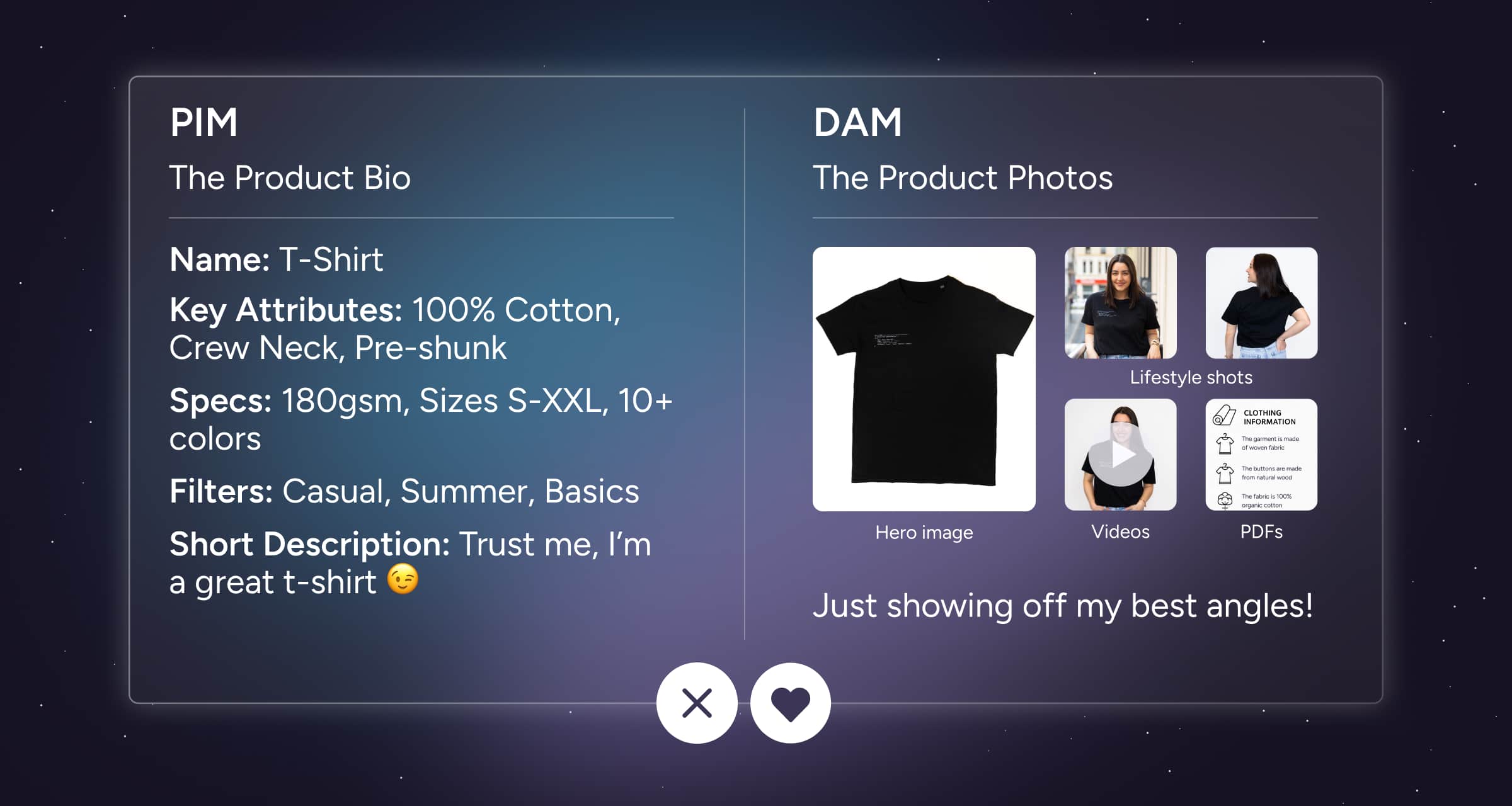
Think of it like a dating app. PIM is your bio (the height, the job, the fact that you love dogs). DAM is your lead photo (the candid shot where you look great).
You are not swiping right on a blank profile. But you are also not meeting up with someone who has no photo.
You need the bio to build trust and the photo to create the spark. It’s the same for your listings: you need both to convert.
What does this look like in real life?
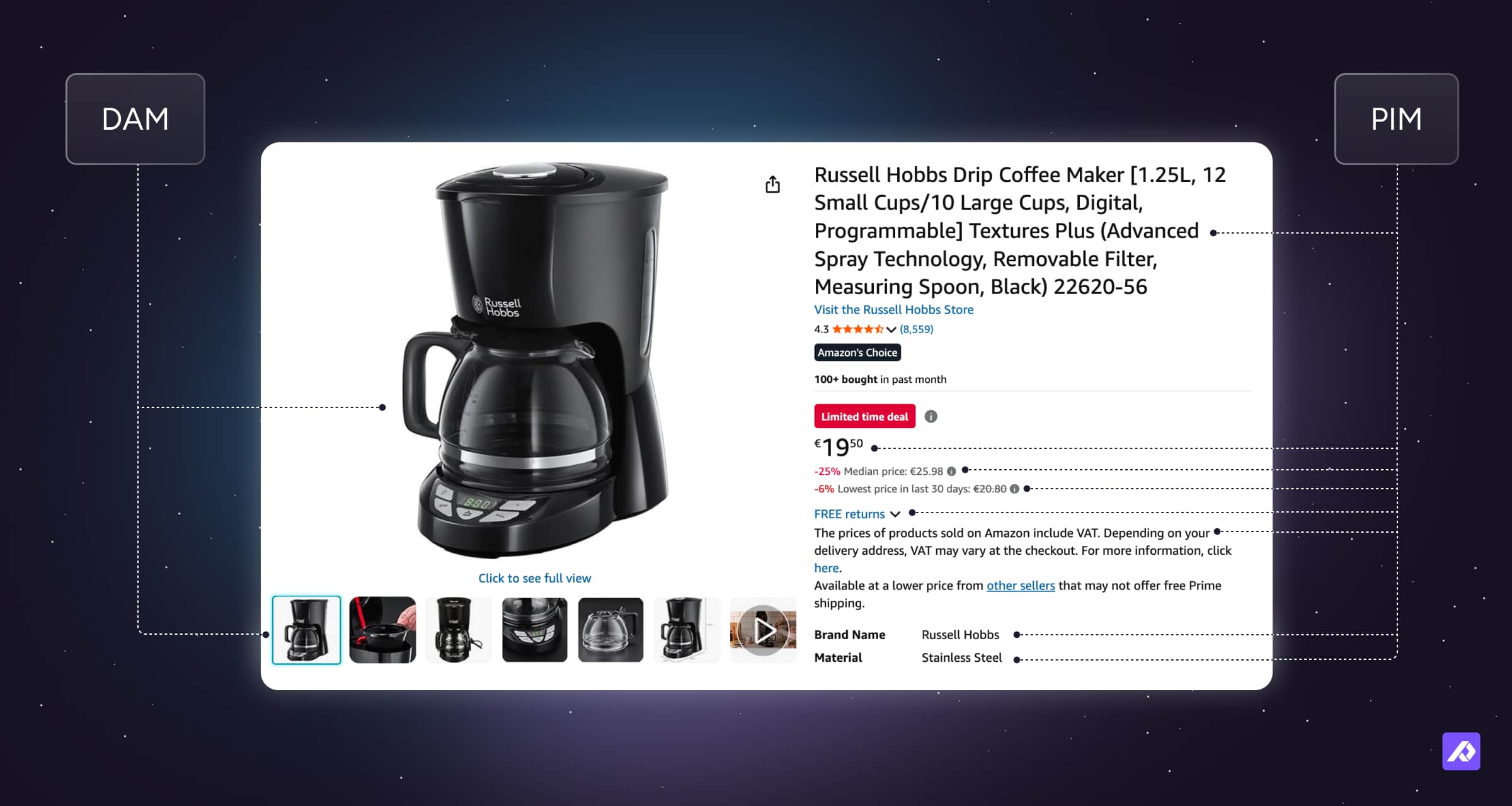
Here’s a simple example using the same product in both systems.
Imagine you sell a coffee machine.
In the PIM, that coffee machine needs:
- Product name and description: EspressoPro 3000 automatic coffee machine with integrated grinder
- Technical specifications: 1450W power, 15-bar pump pressure, 2L water tank, stainless steel housing
- Compatibility and feature attributes: compatible with whole beans and ground coffee, milk frother included
- Localized copy for different markets: English copy for the US store and localized French copy for the FR store
- Channel-ready titles and descriptions: shorter titles for marketplaces and long-form descriptions for your webshop
If any of this is wrong, customers struggle to compare options or understand what they are buying.
In the DAM, that same coffee machine needs:
- Product images from multiple angles: front, side, and top-down product shots
- Lifestyle photos: in-kitchen images showing the machine in use
- Videos showing usage: a short video demonstrating brewing and cleaning
- Instruction manuals and PDFs: downloadable setup guide and warranty document
- Approved brand assets: brand-approved logos and iconography used across listings
If any of this is missing or outdated, customers hesitate or lose trust.
PIM + DAM features vs PIM + DAM integration
As companies grow, when deciding how to use PIM and DAM together, the right setup depends on how much product content you manage and how complex your workflows are:
- PIM with DAM features: Ideal for most brands. You manage both product facts and photos in one home. A high-quality PIM can significantly reduce the need for a separate DAM by offering essential asset manipulation tools, such as:
- Resizing
- Reformatting
- Renaming
- Background removal
These capabilities can often be customized based on the specific requirements of different sales channels or markets.
- PIM + DAM integration: Necessary for global brands. You use a specialized PIM for facts and a separate DAM for thousands of lifestyle shots, social videos, and brand campaigns. This setup is for teams that work with outside agencies and need heavy creative approval loops.
Quick checklist: choosing the right setup
| Set Up | PIM with DAM features works when… | PIM + DAM integration is better when… |
|---|---|---|
| Primary asset focus | Mostly product-centric images tied directly to SKUs | Product-centric images plus brand, campaign, and lifestyle assets |
| Asset reuse across channels | Assets are mainly SKU-bound and used in predictable places (primarily product pages) | Assets are reused across products, campaigns, ads, and brand touchpoints |
| Approvals and reviews | One team reviews product data and product images together | Separate brand, legal, and creative approval workflows |
| Content ownership | Ecommerce or product teams own most content | Marketing, brand, creative, and agency teams share ownership |
| Where assets appear | Webshop and marketplaces | Web, marketplaces, ads, social, partners, and regional sites |
Decision shortcut:
- If you need to move fast with a small team and simple assets: Start with PIM + DAM features.
- If you manage high volumes of creative assets or work with agencies: Start with a PIM + DAM integration.
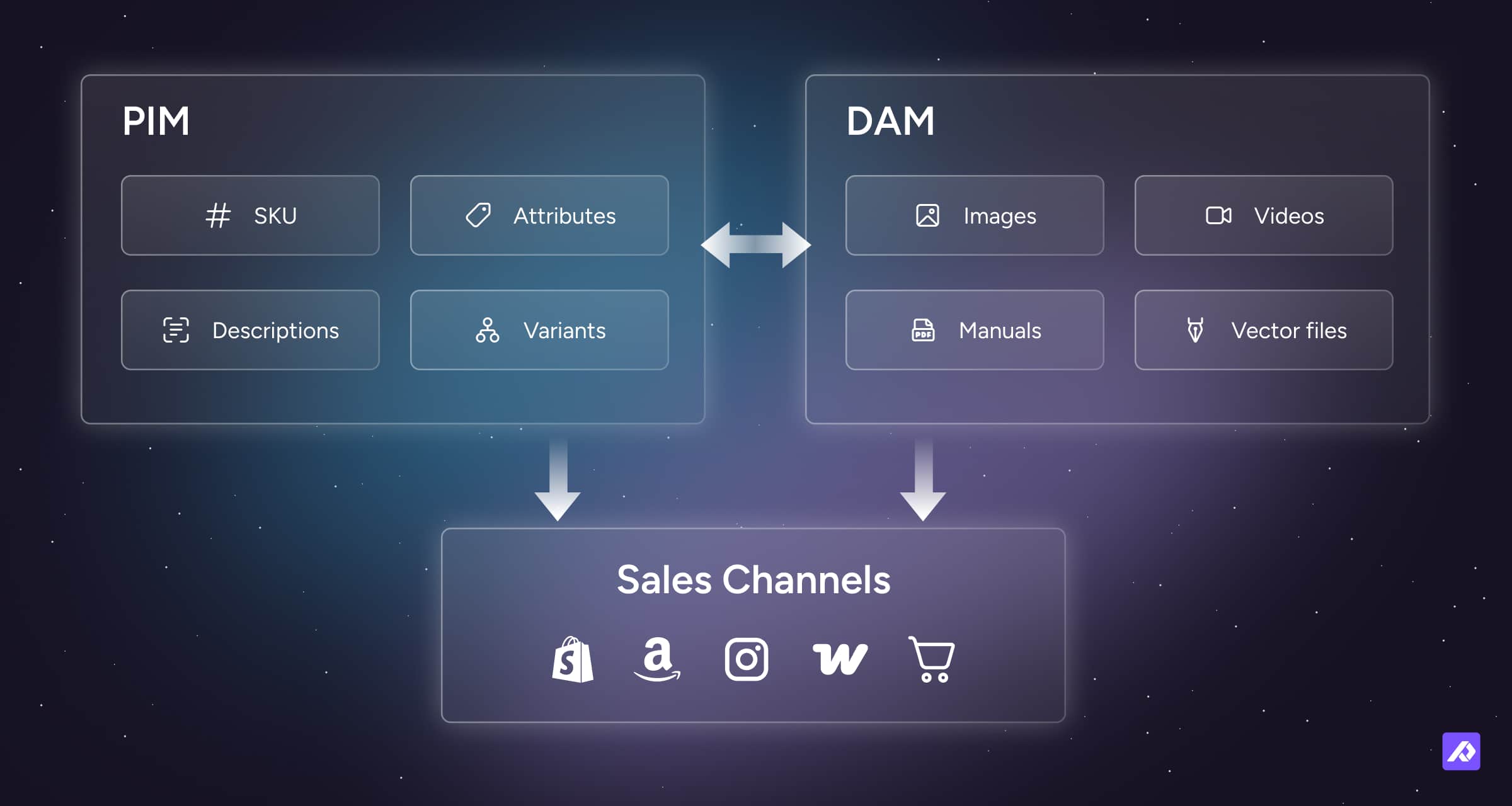
In practice, these systems stay tightly connected through a shared product reference: usually the SKU. This shared link lets teams scale without losing control.
Product information stays consistent, assets stay approved, and no one has to manually match the right image to the right product every time.
When you publish content, the PIM data and the DAM images move together as a single, complete listing.
Final Thought
Understanding the difference between PIM and DAM is less about tools and more about separating product meaning from product media.
Once that distinction is clear, building a scalable content stack becomes much easier.
Frequently Asked Questions
No. A DAM manages files, not product-centric data. It does not handle attributes, variants, or channel-specific product information.
Not fully. While PIM systems can store images, they are not usually designed for advanced asset standards, versioning, or creative workflows.
Since a PIM is the foundation of product data, it is usually the first priority. A dedicated DAM is added as creative volume and brand complexity grow.
PIM ownership typically sits with ecommerce, product, or content teams, while DAM ownership often sits with marketing, brand, or creative teams.