
How to Choose the Right PIM Software in 2026
There are 200+ PIM tools on the market, and most buying guides just list them without helping you choose. This guide walks you through the full selection process in six steps, with vendor questions to ask, an honest market comparison, and a straight answer on when enterprise PIM is more than you need.
Looking for the right PIM software in 2026? This guide shows you how to choose PIM software, compare PIM tools, and find the platform that fits your data, team, and growth goals.
By the Plytix Team · Updated May 15, 2026
TL;DR
- Start by figuring out whether your problem is governance, tooling, or both.
- Choose the right setup first: SaaS, open-source, or custom-built.
- Define your must-have features before you look at demos.
- Compare the real cost, not just the subscription price.
- Test every PIM with your own data, not just a polished sales demo.
- Plan implementation before you sign, especially ownership, cleanup, and rollout order.
- Enterprise PIM is not automatically better. For many ecommerce teams, it is more than they need.
- The best PIM software is the one that fits your catalog complexity, team workflow, channels, and growth plans.
Who this guide is for
If you're an ecommerce manager responsible for keeping product data accurate, complete, and ready to sell across multiple channels, this guide was written for you. Whether you're evaluating PIM software for the first time or replacing a system that has stopped scaling with your needs, it will walk you through the full selection process, from diagnosing the real problem to pressure-testing vendors before you sign.
It is also useful for marketing managers, brand managers, and anyone else who regularly touches product content and ends up being part of the decision about which platform to use.
If you run a true enterprise operation with thousands of channels and a dedicated IT governance team, much of this will still apply, but you will probably want a more formal RFP process alongside it.
Do you need a PIM yet?
Before you start comparing vendors, it helps to answer one basic question: do you actually need PIM software now?
| If your situation looks like this | Best next step |
|---|---|
| Small catalog, limited channels, stable data, low supplier complexity | Tighten governance first |
| Mostly one channel, manageable product structure, light bulk-editing needs | Native ecommerce tools may still be enough |
| Multiple channels, supplier inconsistency, repeated manual fixes, growing catalog complexity | Start evaluating PIM software now |
| Teams are duplicating work across spreadsheets, assets, feeds, and channel backends | A PIM is probably overdue |
Not every business needs a PIM immediately. But if product launches are slowing down, channel updates feel fragile, or nobody trusts the same version of the product data, the cost of waiting adds up quickly.
What is PIM software, and why does this decision matter so much?
PIM stands for Product Information Management. It is the system that acts as a single source of truth for everything about your products: descriptions, images, pricing, specs, attributes, and channel-specific variations.
Without one, that information usually scatters. It ends up in spreadsheets, email threads, shared drives, the backend of your ecommerce platform, and inside people's heads. The result is familiar: conflicting listings, manual fixes, slow launches, and a growing ceiling on how far the business can scale.
With the right PIM, you update product information once and push it across channels with far less friction. Teams get the access and structure they need, and product content becomes easier to manage, trust, and improve.
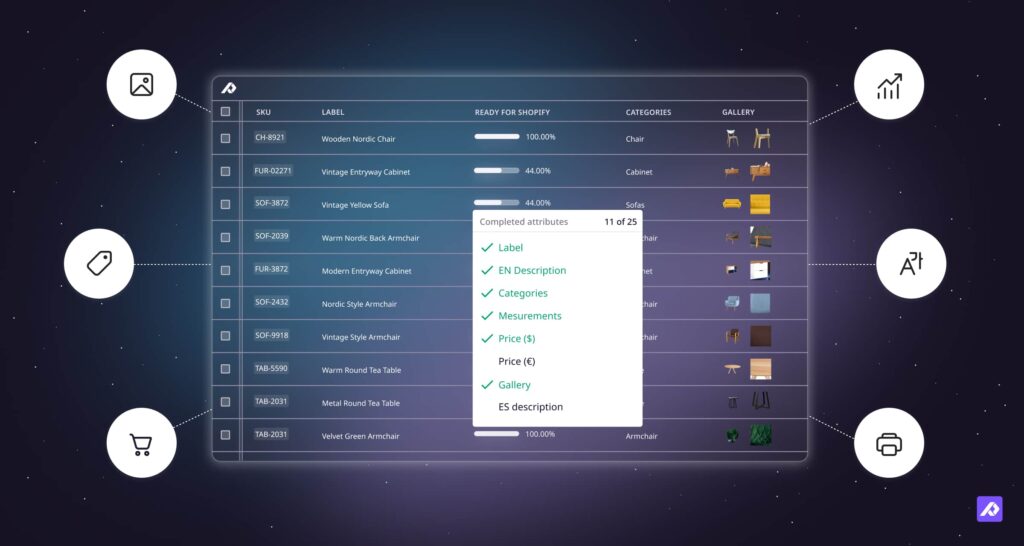
That is where many buying guides fall short. They treat PIM as a storage problem. In practice, it is also a content problem. Product content affects discoverability, trust, and conversion, so the platform you choose needs to support more than tidy data.
This guide will help you evaluate both sides of that decision.
The state of product data in 2026: why this decision matters more than ever
The case for investing in a proper PIM is not abstract. The numbers are specific.
Forrester found that digital businesses now attach up to 200 attributes to a single product. That is not a volume a spreadsheet handles gracefully, and it is usually the point where manual product data work starts to crack.
The commercial cost shows up in returns. In 2024, 13.2% of all retail sales were returned. Of shoppers who returned something, 56% said it was because the product did not match its description. That is not just a logistics issue. It is also a product content issue.
AI is changing expectations too. In practice, that means teams increasingly expect a PIM to help with tasks like generating product descriptions, identifying missing data, translating content for new markets, and improving images without jumping between tools.
The trend is clear. Product content is becoming a bigger competitive advantage in ecommerce, and the tools used to manage it are being expected to do more than they were just a few years ago.
Before you start comparing vendors, answer these four questions
Before you compare vendors, answer these four questions as clearly as you can. They will shape almost every part of your evaluation.
| Question | Why it matters |
|---|---|
| Where does your product data come from? | This shapes your import, mapping, and integration needs. |
| Where does your product data need to go? | This defines your export requirements, channel formatting, and distribution needs. |
| Who needs access internally? | This affects permissions, workflows, approvals, and day-to-day collaboration. |
| What does success look like in 12 months? | This gives you a real standard for judging vendors instead of reacting to demos. |
Once you have those answers, the selection process gets much clearer. You stop reacting to demos and start evaluating which setup fits your data, your team, your channels, and your goals.
How to choose PIM software: a 6-step process
You do not need to review every PIM on the market. You need a process that helps you narrow the field.
The six steps below keep the evaluation grounded. They help you diagnose the real problem, choose the right setup, evaluate features, test vendors properly, and plan implementation before you sign.
Step 1: Diagnose whether your problem is governance, tooling, or both
You usually need a PIM when the cost of not having one starts showing up in your team’s weekly workload. But before you jump straight to vendors, it is worth asking whether your problem is mainly tooling, mainly governance, or a mix of both.
One of the clearest signals is this: your team is spending roughly 20% of its working week on manual product data cleanup. One full day per person, every week, just keeping information accurate. That adds up fast.
Other signs your current setup is failing:
- Launching on a new sales channel takes more than two weeks because of data prep alone.
- A customer returns a product because the listing specs were wrong.
- Different teams are working from different versions of the same attribute.
- Product descriptions are being copied manually between platforms.
- A supplier updates a spec and someone has to touch every affected listing individually.
- Images, copy, and channel feeds all live in different places and constantly drift out of sync.
If several of those sound familiar, the issue is not just efficiency. It is structure. Sometimes that means you need better software. Sometimes it means you also need better ownership, cleaner workflows, and clearer rules for how product data is managed across teams.
Once you know whether the real issue is governance, tooling, or both, the next question is what kind of system you actually need.
Step 2: Choose your architecture
PIM comes in three main forms: custom-built, open-source, and SaaS.
For most commerce brands, SaaS is the most practical option.
This choice matters because it affects more than the software. It affects who maintains it, how quickly you can get value from it, and how much ongoing complexity your team inherits.
| PIM Type | Description | Best For | The Reality |
|---|---|---|---|
| Custom-built PIM | Built from scratch by your team or an external agency to exact specifications. | Large enterprises with in-house engineers, highly specialized data models, or unmet regulatory requirements. | Takes longer than SaaS, you own the long-term burden (hosting, security, updates, integrations). |
| Open-source PIM | Starts with a free code framework, adapted by you or a partner. | Teams with development resources who want near-custom flexibility with a faster starting point. | The software is free, but the project is not. Hosting, customization, security, updates, and integrations still cost time and money. |
| SaaS PIM | A cloud-hosted platform maintained by the provider. You configure and use it. | Most commerce brands that need to move quickly, keep costs predictable, and focus on product content, not software maintenance. | You give up some control over the underlying code, but gain a working, updated platform that helps you move faster. |
When you account for implementation, maintenance, updates, integrations, and opportunity cost, SaaS is usually the strongest fit for growing commerce brands.
That gets you to the next question: which capabilities are actually essential once you start comparing tools?
Step 3: Define your must-haves vs. nice-to-haves
Start with the essentials: unlimited attributes, filtering, bulk editing, built-in DAM, permissions, product relationships, and flexible import and export.
If product content is a growth lever for your business, then features like AI, feed management, completeness scoring, and workflow deserve extra weight.
This step works best as a checklist, not a brainstorm. Start with the basics every serious PIM should handle well.
Core must-have features
| Feature | Description |
|---|---|
| Unlimited attributes | Your catalog will keep getting more detailed, and your PIM should not punish you for that. |
| Advanced filtering | Teams need to find the right products quickly, not hunt through the catalog one condition at a time. |
| Bulk editing | If every major change still requires row-by-row cleanup, the tool is not solving much. |
| Built-in DAM | Images, PDFs, and other assets should live with product data, not in a disconnected file pile. |
| User permissions | Different teams need different access, and that should be easy to manage. |
| Product relationship management | Variants, bundles, accessories, and related products should not require manual workarounds. |
| Flexible import and export | You need reusable imports and exports that can adapt to different channel requirements. |
Those are the essentials. If product content is a growth lever for your business, these features deserve extra attention.
Growth-critical features worth weighing heavily
| Feature | Description |
|---|---|
| AI-powered content creation | Useful AI should reduce work, not create more editing. |
| Feed management and channel distribution | Great content still needs to reach each channel in the right format. |
| Content completeness and quality scoring | Teams should be able to see what is publish-ready at a glance. |
| Collaboration and workflow tools | Clear ownership and approvals matter once multiple people touch the same content. |
| Localization and translation support | Managing multiple markets should not mean duplicating product records. |
| Variant and family management | The platform should handle parent-child structure cleanly. |
| Data validation and error handling | You want issues caught before they hit a channel. |
| Custom views and saved filters | Day-to-day usability matters more than many demos suggest. |
| Role-based workflows and approvals | Content handoffs should be built into the process, not managed through side conversations. |
| Integration flexibility | Your PIM needs to fit your wider stack, not just connect to one or two tools. |
| Scalability without pricing traps | Growth should not trigger constant surprise upgrades. |
| Support quality and onboarding depth | A powerful tool is less useful if your team cannot get up to speed quickly. |
Once you know which features matter most, you can start looking past the headline subscription price.
Step 4: Understand the real cost
The real cost of a PIM usually includes more than the headline subscription.
Look closely at fees, onboarding, support, and contract structure before comparing vendors side by side.
| Cost factor | Why buyers miss it |
|---|---|
| Per-user fees | They can seem small at first, then grow quickly as more teams need access |
| Storage limits | Rich media and large catalogs can push costs up faster than expected |
| Connector and integration costs | Some platforms charge extra for the connections you actually need most |
| Implementation fees | A lower subscription price does not always mean a lower total cost |
| Training and ongoing support | These costs matter more than buyers often expect once rollout begins |
| Contract duration | A long commitment is riskier if you have not properly tested the platform first |
PIM pricing is difficult to compare because the real cost often shows up in the fine print.
Compare the full operating cost, not just the base subscription. Once you do that, the next step is obvious: test the tool properly.
Step 5: Run a proper trial, not a sales demo
A sales demo is a performance. The data is clean, the presenter knows exactly where to click, and everything works in the best possible conditions.
A real trial should answer a different question: what will this feel like for your team with your actual data?
Bring your own sample products into the trial. Test the exact task that creates the most friction today, whether that is bulk updates, missing-image cleanup, or getting content ready for multiple channels.
Then check independent reviews on G2 and Capterra. Pay close attention to comments about onboarding, support, and real-world ease of use. Those often tell you more than a feature walkthrough ever will.
If a tool looks good in a demo but starts to feel awkward as soon as you use your own data, that is a signal worth taking seriously.
If a vendor passes that test, the last major question is whether your team can implement it cleanly.
Step 6: Plan implementation before you sign
Most PIM failures come from poor rollout planning, not bad software.
Before you sign, get clear on ownership, cleanup, rollout order, and what success should look like after launch.
A surprising number of software projects fail for boring reasons: unclear scope, messy data, unclear ownership, and too little alignment across the people who actually need to use the system.
Before you sign, build a simple implementation roadmap that answers these questions:
- Which team members need access from day one, and at what permission levels?
- What data needs to be cleaned before it can be imported properly?
- Which channels are you rolling out first, and in what order?
- Who owns adoption and ongoing system management internally?
- What should success look like at 30, 60, and 90 days?
The more stakeholders involved, the more important this becomes. Marketing, ecommerce, operations, and brand teams often care about the same data in different ways. Getting aligned early saves a lot of cleanup later.
Once you have worked through those six steps, you are ready to look at where different types of PIM platforms fit.
Which type of PIM software is right for your business?
There is no objectively best PIM. There is the right fit for your size, goals, and team structure.
| PIM type | Examples | Best for | Typical investment | Typical timeline | Choose this when… | Avoid this when… |
|---|---|---|---|---|---|---|
| Enterprise PIM suites | Inriver, Salsify, Akeneo Enterprise | Large organizations with complex product hierarchies, multi-region operations, hundreds of channels, and dedicated IT/data governance teams | $30,000 to $150,000+ per year | 6 to 18 months | You need enterprise-grade modeling, advanced governance, and have the budget and internal resources to support it | You need to move quickly or do not have the technical resources to support a heavy rollout |
| Mid-market PIM platforms | Pimberly, Sales Layer, Contentserv | Scaling companies that need more structure and automation without full enterprise complexity | $10,000 to $50,000 per year | 6 to 12 weeks | You need stronger channel support and better structure, but want a lighter rollout than enterprise software usually requires | You need deep enterprise customization or extensive governance layers |
| Content-led growth platforms | Plytix | Commerce brands where product content quality and speed are growth drivers | $6,000 per year and up, depending on plan and add-ons | Days to a few weeks | You want to improve product content, move faster across channels, and use product content as a growth lever | You need highly specialized enterprise modeling or very deep custom development |
For many ecommerce teams, the choice is less about finding the most powerful platform on paper and more about finding the one that fits their actual catalog complexity, workflow, and rollout reality.
Which PIM providers should you actually consider?
Many of the best-known PIM vendors are built mainly for large enterprises with bigger budgets and technical teams.
For many commerce brands, the more realistic shortlist includes tools that are easier to trial, faster to implement, and less expensive to operate.
The comparison below gives you a quick view of five commonly evaluated options and how they differ on price, trial access, and target customer.
Most of the top PIM software comes in one shape and size: large, expensive, and built around the assumption that you have a dedicated implementation team and a six-figure annual software budget. Feature-heavy platforms with complicated workflows, expensive add-ons, and long onboarding runways were the norm for a long time. That model is becoming less defensible as better-built alternatives take market share.
What commerce teams actually need is something flexible and easy to use, easy for new team members to learn, and designed to grow with the business rather than requiring a new procurement process every time requirements change.
To help you orient yourself in the market, here is a straightforward comparison of the five most commonly evaluated PIM platforms.
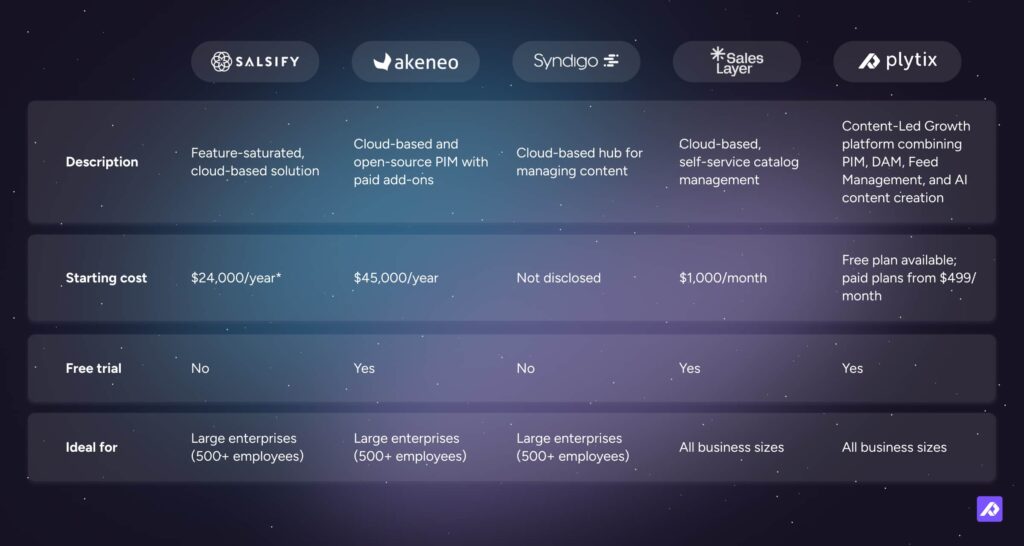
*Pricing based on customer-reported figures.
The pattern in that table is not subtle. Three of the five platforms are built primarily for large enterprises, carry five- or six-figure annual costs, and offer no free trial before commitment. For a commerce brand that needs to move quickly and wants to validate a platform before locking in, the shortlist narrows fast.
Plytix is easier to trial, faster to adopt, and more transparent on entry pricing than most enterprise tools. At the same time, businesses that need very deep enterprise customization, extensive governance layers, or highly specialized data modeling may still prefer an enterprise suite.
Head-to-head: how the top five PIM platforms compare
Feature lists tell you what a platform can do. This comparison shows how platforms perform across the dimensions that matter in daily use.
Ease of use and customer support are consistently the criteria that separate platforms in practice, not just on paper.
The comparison below scores each platform across five dimensions that matter most to commerce teams evaluating PIM software: ease of use, features, catalog management capability, integrations, and customer support.
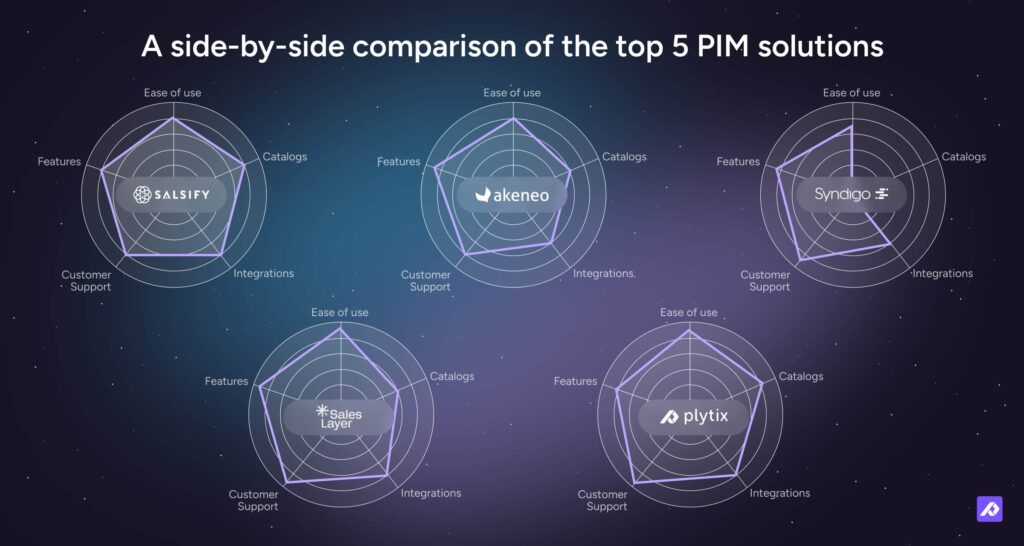
These ratings reflect a mix of typical buyer feedback, implementation experience, and how each platform is usually perceived by mid-market and ecommerce teams.
A few patterns stand out. Enterprise tools often score well on raw capability, but can feel heavier to adopt and support day to day. Simpler platforms tend to feel more accessible, while more content-focused platforms often stand out on usability, support, and connected workflows.
If product content is your growth lever, not just a data chore, that difference matters.
Want to see how Plytix compares in more detail? View the full PIM comparison · Start a free Plytix account
Questions to ask every vendor before you commit
Use this section to pressure-test vendors on the areas that matter most: data structure, imports, assets, channel distribution, AI, support, and cost.
The goal is to surface limitations, hidden work, and extra fees before you sign.
Bring these questions to every serious vendor conversation so you can compare answers, not just impressions.
A vendor conversation without a prepared question list tends to go one way: they show you the features they are most proud of, you nod along, and you leave with a good feeling but no real comparative data. These questions are designed to change that dynamic.
On data centralization
- Can this system store every attribute type we use without hitting a cap?
- How does it handle variants, bundles, and accessory relationships?
- What happens if two people edit the same product at the same time?
On imports and updates
- Can we import from CSVs, XMLs, and supplier feeds?
- Can we schedule imports automatically?
- How does the system handle missing or malformed data during an import?
On digital assets
- Are digital assets managed inside the platform or through a separate DAM?
- Can we link files to specific variants, not just parent products?
- Can permissions restrict access to certain assets?
On channel distribution
- Can we customize exports for different channels without duplicating product records?
- Can exports run automatically on a schedule?
- How does the system handle field mapping and channel-specific formatting?
On AI
- What exactly does the AI do in the workflow?
- Is AI usage limited by plan?
- Can it reflect our brand voice, or will it still need heavy rewriting?
On support and onboarding
- What does implementation actually look like in practice?
- Is there a dedicated onboarding contact?
- After go-live, what does support and escalation look like?
On cost
- Are there per-user fees, and how do they scale?
- Is storage unlimited?
- Are there extra charges for connectors, integrations, or channel feeds?
Final Thought
Adopting a PIM can feel like one of those decisions where the questions multiply the longer you look at it. Who is this going to affect? Ecommerce? Marketing? Sales? Operations? How long will it take to get set up versus fully embedded in the way your team actually works? Which features are genuinely going to solve your problems, and which ones just sound impressive in a demo?
That is exactly why it pays to slow down and do the homework. Not because you need to evaluate every tool on the market, but because you want to make the decision with confidence. The right PIM should make product data easier to manage, easier to trust, and easier to turn into content that performs across channels.
For some businesses, that will mean a traditional enterprise or mid-market PIM. But for many modern ecommerce teams, the bigger opportunity is not just centralizing product data. It is using that data to create better content, move faster across channels, and turn product content into a stronger commercial asset.
The best choice is rarely the one with the most complexity. It is the one that fits your team, your workflow, and the way your business actually grows.
Frequently Asked Questions
You choose a PIM system by starting with your real bottlenecks, not the vendor list. Look at where your product data comes from, where it needs to go, and which tasks are slowing your team down most. Then compare tools based on fit, usability, total cost, and how realistic the rollout feels.
The right criteria for selecting PIM software are the ones that affect your team every day. Can it handle your catalog structure, support your channels, make bulk updates easier, and work well for the people actually using it? After that, compare onboarding, support, integrations, and pricing as you grow.
You probably need PIM software when product data starts slowing the business down. If launches take too long, updates across channels feel manual, or teams keep working from different versions of the same information, that is usually the point where spreadsheets stop being enough.
The best PIM software for ecommerce teams depends on your catalog complexity, team setup, and channel mix. Some teams need enterprise-grade structure and governance. Others need something faster to adopt, easier to use, and better suited to day-to-day catalog work.
Open-source PIM is only free in the narrowest sense. You may not pay for the software license, but you still pay for setup, hosting, customization, maintenance, and developer time. For some teams that makes sense. For others, SaaS ends up being the cheaper option overall.
PIM implementation can take anywhere from a few weeks to several months, depending on the platform and the state of your data. SaaS tools are usually faster to launch, especially if your data is fairly clean. Enterprise setups tend to take longer because the rollout is broader and more complex.
Before buying PIM software, ask how it handles attributes, variants, imports, digital assets, exports, permissions, onboarding, and support. You should also ask what implementation really looks like, what extra costs are common, and whether the system works well with your own data, not just in a polished demo.
The difference is mostly about scope. A traditional PIM focuses on organizing and distributing product data. A content-led growth platform goes further by helping teams improve, enrich, and publish product content in ways that support faster launches and better channel performance.
Use the vendor questions above with every platform you evaluate. If you want to see what a platform built for content-led growth looks like in practice, start a free Plytix account, no strings attached, no time limit.